

A call center or business-process site can put a photograph a floor lead can match on an agent badge, on a client-program card, and on a visitor or vendor pass, when it keeps those three files apart. Name the file before the offer goes out, capture the face before the nesting class starts, and store an end date on every card the site prints. A Form I-9 portrait, a right-to-work check, and a passport or visa stay on the path that owns them.
Employees follow the employee badge page and the HR badge guide. Agency placements follow the staffing guide and still need your program card. Door security follows the security guide. A branch badge follows the bank guide, a store badge follows the retail guide, and a clinic follows the healthcare guide. Travel documents follow the immigration guide. Starting from $0.20 per photo.
What does one shared photograph cost a call center?
The cost shows up when the class starts. A trainer holds the room because the new agent's only picture is a screenshot from the video interview. Last quarter's program card still opens the client floor. A visitor printed on the agent template walks the aisle looking like someone who works there.
The U.S. Bureau of Labor Statistics counts 2,666,000 customer service representative jobs in 2025 and projects a 5 percent decline by 2035, to 2,524,100. It still projects about 289,500 openings a year, on average, because people leave the occupation. A photo desk built for one portrait day a year misses the Monday class. Many of these jobs are in call centers, some centers are open 24 hours, and some people work from home. Training is usually on the job and typically lasts two to four weeks, so the photograph has to exist before that window. Large employers include retail trade (15 percent), insurance carriers and related activities (12 percent), and business support services (8 percent).
| File | Who it is for | When it ends | What goes wrong when the files are mixed |
|---|---|---|---|
| Agent badge | An employee of the operator. | Employment ends, or the date you stored. | An interview screenshot, or no end date after the person leaves. |
| Client-program card | One campaign or one client floor. | The last day of that assignment. | Last quarter's card still opens the floor, or a move is treated as a termination. |
| Visitor or vendor pass | An auditor, a tour, or a technician. | The visit, or the purchase order. | A visitor who looks like an agent, or a finished install that still opens the door. |
| Form I-9 | People employed in the United States. The employee chooses the documents. A badge is not on the Lists of Acceptable Documents. | The Handbook's clock. | Filing the badge as proof of identity, or specifying which document to bring. |
| Right to work | Before UK employment. See GOV.UK. | The check's own record. | Offering the badge as that check. |
The Handbook for Employers requires Form I-9 when you hire someone in the United States for wages or other remuneration. Section 2 is due within three business days of the first day, or on the first day when the job lasts fewer than three.
Where the floor is part of a cardholder data environment, PCI DSS v4.0.1 (June 2024) sets identification rules that are separate from the crop. Requirement 9.3.1 calls for procedures that identify personnel and withdraw that identification, and the guidance gives a badge as one example. Requirement 9.3.1.1 says access to sensitive areas is revoked immediately when employment ends, and that keys and cards are returned or disabled. Requirements 9.3.2 and 9.3.3 say visitors are approved before they enter, escorted the whole time, and given identification that expires, looks different from a personnel badge, does not itself open the door, and is surrendered or deactivated before they leave or on the expiration date. A floor that never handles cardholder data is outside those requirements.
Which file owns this photograph?
The operator sets the crop and decides which door the card opens. A client security desk may see the program-card portrait when the statement of work asks for a face it can match. It does not receive Form I-9 or the right-to-work file.
Employment, and a move between programs. Paid U.S. hires follow the Form I-9 rule above. A right-to-work check happens before UK employment. Workday or SAP SuccessFactors sync is for employees already in those systems. When someone moves programs, deactivate the old program card and open a new one. Leave the employment badge in place.
The visitor log, a travel document, and a later site day. On a cardholder-data floor, the portrait does not replace the visitor log in requirement 9.3.4: name, organization, date and time, and who approved the visit, kept at least three months unless the law restricts that. A UK passport photograph meets GOV.UK photo rules, and HM Passport Office still decides. A UK passport photo code retrieves it. A U.S. visa photograph follows the Department of State and stays unedited. An agent at home until a site day uses the link. Print and mailing, available per request, covers a card that has to exist before arrival. Match the face at the door.
How do call centers collect these photos today?
One inbox holds Sunday night's replies: an interview screenshot, a bedroom selfie, a careers-page headset photo, and a passport scan meant for a right-to-work check. Someone crops them after the roster goes out. The night class starts while the photo desk is closed, and next quarter the old program card still opens the client floor.
What does a split workflow look like?
Name the file before the first link goes out, and store an end date on every card. On Monday 23 November 2026 one floor runs a client program through 31 January 2027. A new agent starts nesting that morning. An agent whose program ended Friday 20 November 2026 keeps the employment badge and receives a new program card. A headset vendor stays through 24 November. A client auditor is in for two hours, and that review ends the pass.
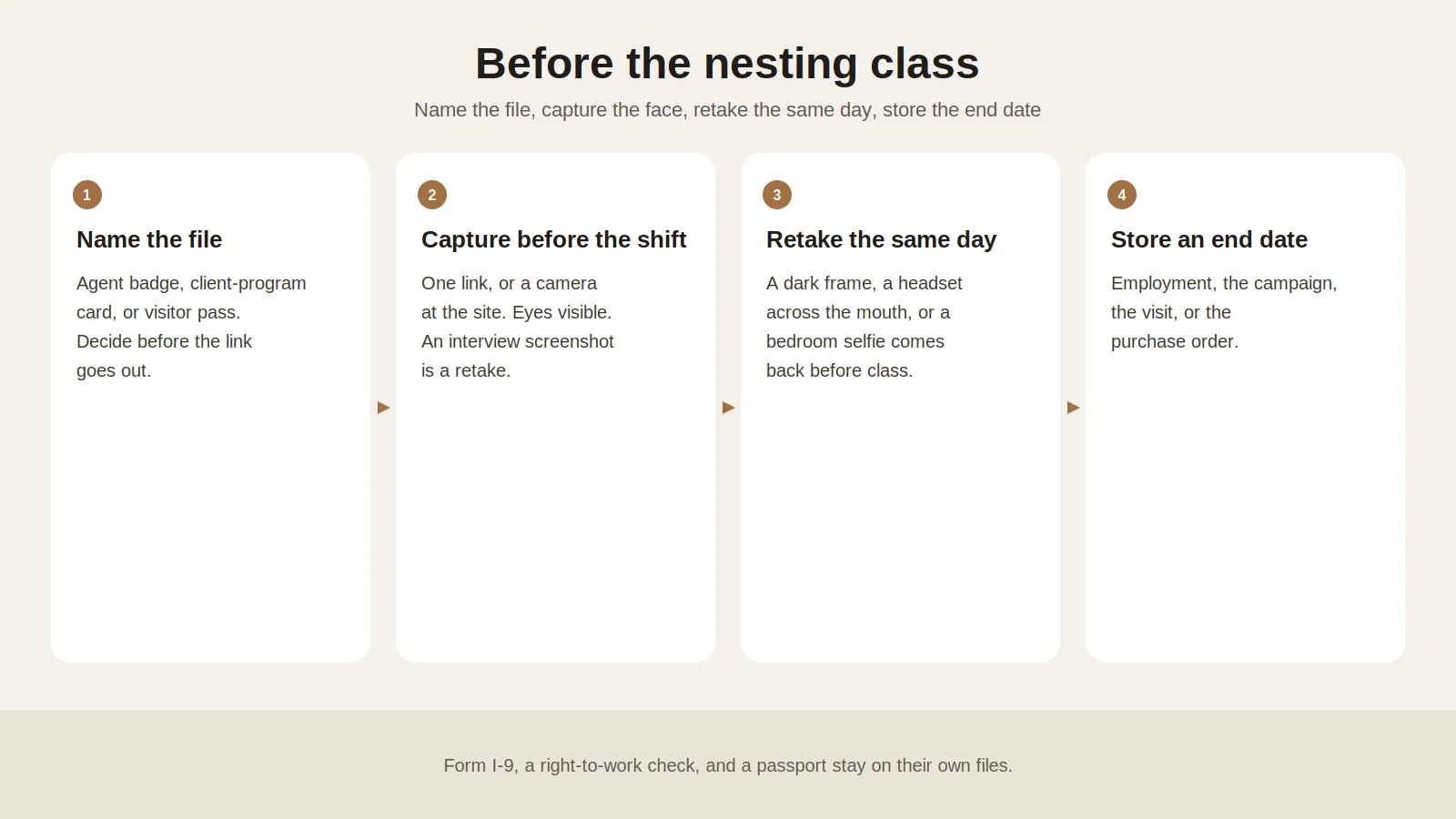
1. Write down who holds the camera. One person, eyes visible, on the link or at the site. An interview screenshot, a headset across the mouth, or a bedroom selfie is a retake. A generated headshot stays on the careers page. A religious head covering worn daily can stay when the face is visible and the template says so.
2. Sort people by the record that already owns them. The agent badge follows employment. The program card ends on the last day of that assignment. The visitor pass ends with the visit or the purchase order. A move between programs is a new card, not a new hire.
3. Collect the file on one link, or at the site. The badge photo service emails one link per person, expired after use, available per request from support@idphoto.ai. It leaves Form I-9, the right-to-work check, and the passport alone. A 22:00 class uses that link. Keep a camera at the site for anyone who did not.
4. Reject a bad capture the same day. A photo compliance check can return a pass or a fail before you print. Background removal and photo enhancement apply only when the template allows them. A passport or a visa stays unedited. A face-mask check is available per request. Send the common mistakes guide back while the person is still on the link.
5. Write the file back with its date. Face comparison checks a replacement. Liveness detection is available per request on a phone capture. Take the copy back, or use a temporary link of 2 hours to 14 days, and deactivate the card on its date.
6. Batch one class on one template. Batch preparation returns a retake list before the class is seated. Print the three cards in three colors. On a cardholder-data floor, the visitor color is obvious without reading the name, and that card does not open the door by itself.
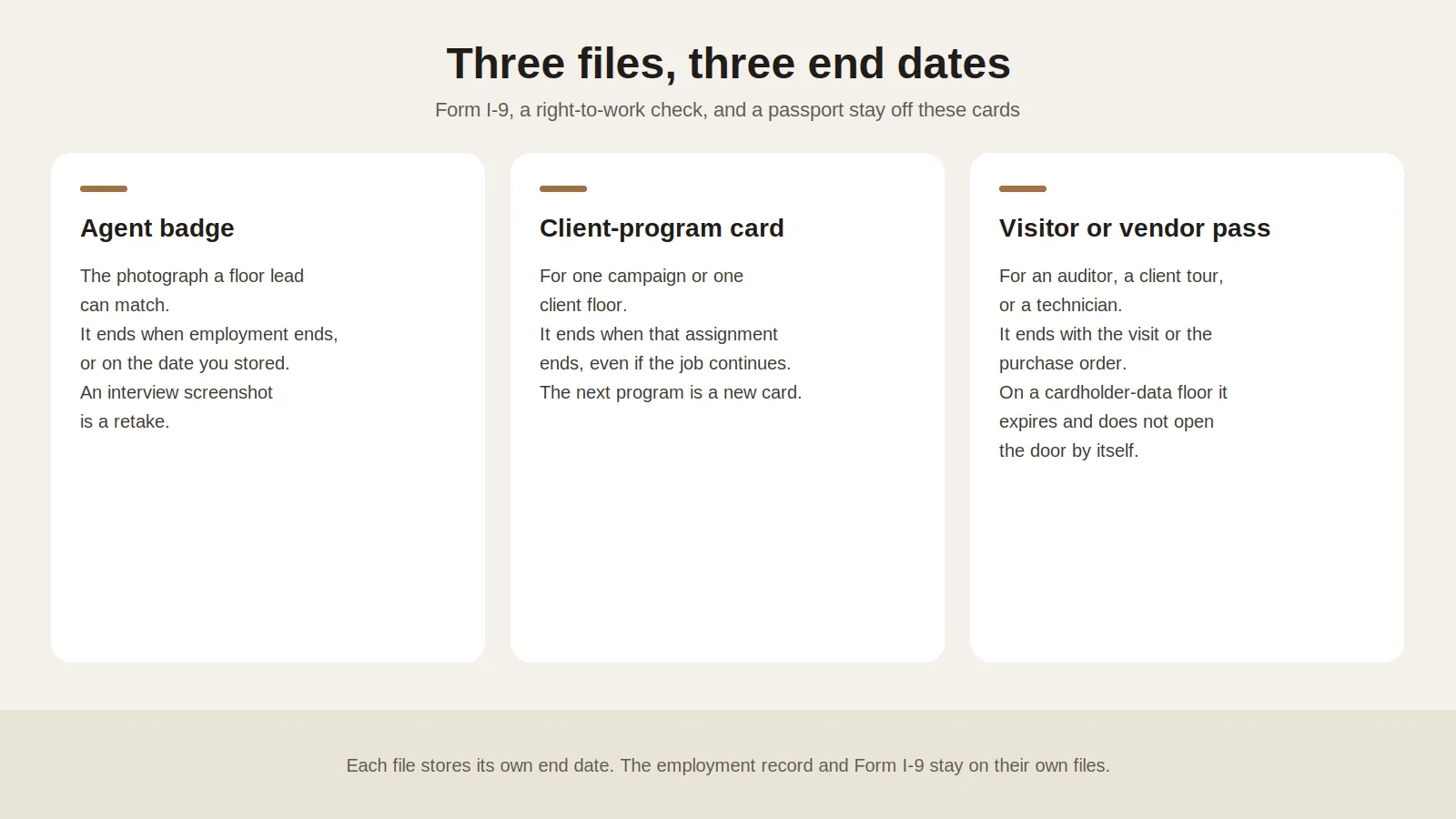
Print the name, the program, and the end date on the card. Keep the door list on the access record.
What should a call center require from a photo service?
| What you need | What good looks like |
|---|---|
| A specification per card | Size, crop, and background per window. See the spec code reference. A passport and Form I-9 sit outside it. |
| Rejection before the class | Face, light, blur, and framing the same day, including a class after the photo desk has closed. Leave a passport unedited. |
| A path off the headquarters camera | One link per person, expired after use, plus a camera at the site. |
| The record that owns the person | The file returns with its end date. Workday or SAP SuccessFactors sync is available per request for employees already in those systems. The program card stays separate. |
| A check a floor lead can explain | Face comparison and liveness detection, available per request. The operator still decides who may enter. |
How do you roll this out at one site first?
Write the file rule before the first link. Name the three templates, the end dates, and which doors each card opens. Name who completes Form I-9, who runs the right-to-work check, and who keeps the visitor log on a cardholder-data floor. A move between programs does not end employment.
Run one site for one training cycle. Use the 23 November 2026 class, and add an agent who trains from home until the second week plus a paid class shorter than three business days, so Form I-9 is finished on that first morning.
Add the next site after a write has held. Prove a clean upload, a same-day retake, and one failed write that is retried, then open the second site on the same templates. Connect Workday or SAP SuccessFactors for employees only after support confirms it. Contractors, visitors, and program cards stay off that sync. Delete the card copies on their dates.
Where do call-center photos usually fail?
| What fails | What to change |
|---|---|
| Last quarter's program card still opens the client floor | Deactivate it on the assignment's last day. The next program is a new file, in a different color. Leave the employment badge in place. |
| A contractor is added as staff so the photo will sync | Keep the vendor pass. Sync is for employees already in Workday or SAP SuccessFactors. |
| A visitor badge looks like an agent badge | Use a color a person can tell apart without reading the name. On a cardholder-data floor, that pass expires, does not open the door by itself, and is surrendered or deactivated when the visit ends. |
| The badge is offered as Form I-9 proof, a right-to-work record, or a passport | Those records stay on the files that own them. The card is for the door. |
| Access is still live the morning after a termination | On a cardholder-data floor, requirement 9.3.1.1 revokes access to sensitive areas immediately, and keys and cards come back or are disabled. Store the end date before the last shift. |
Who may see a call-center photograph?
The person, the people team, and the floor leads who match a face may see the file that role needs. A client security desk may see the program-card portrait when the statement of work says so, and does not receive Form I-9 or the right-to-work file. Delete the operator's copy on the card's date. GDPR Article 5(1)(e) and the CCPA apply where those laws apply. The data privacy policy covers encrypted transmission, a temporary link of 2 hours to 14 days, or taking the image back. US and EU processing are available. Other regions are available per request.
What do site directors ask?
Does every agent need a photograph on a badge?
Print one where a floor lead matches a face to your record. Form I-9, the right-to-work check, and a passport stay on their own files.
Can the interview screenshot go on the agent badge?
No. Capture a plain portrait, eyes visible. A generated headshot stays on the careers page.
Can a client-program card use the employment template?
No. Store the assignment's last day on the program card. The employment badge stays when the person moves.
Can someone send a photo before the first shift?
Yes. One link, expired after use, available per request from support@idphoto.ai. Keep a camera at the site.
Does PCI DSS require a photograph on the badge?
No. Where the floor is a cardholder data environment, PCI DSS v4.0.1 requires people to be identified. A badge is one example. Visitor identification expires, looks different, and is surrendered or deactivated when the visit ends.
Does the badge replace Form I-9 or a right-to-work check?
No. A badge is not on the Lists of Acceptable Documents. A UK check happens before you employ someone.
When should the photograph be deleted?
Delete the operator's copy on the card's date. A new program is a new file. The visitor log, where PCI DSS applies, follows requirement 9.3.4.
What does preparing the photograph cost?
It starts at $0.20 per photo. The catalog covers 300+ specifications across 200+ countries.
How does idphoto.ai fit this workflow?
The idphoto.ai API is the photo step. It prepares a portrait to the template you name, checks the capture, and returns a file for the employment record, the program record, the visitor record, or the printer. The operator decides who receives a card and which door it opens. A UK passport photo code retrieves a photograph that meets GOV.UK photo rules, and HM Passport Office still decides. Preparing a photo starts at $0.20.
Templates, the self-service link, Workday or SAP SuccessFactors sync, print and mailing, liveness detection, a face-mask check, another processing region, and the Shopify store template with one-click setup are each available per request. The store template is for a counter that sells photos, and it stays off the agent record. Email support@idphoto.ai with the card designs, which doors each pass opens, and how the file returns. Samples stay in the API docs.
Where do these rules come from?
- BLS Occupational Outlook Handbook, Customer Service Representatives.
- PCI Security Standards Council document library, PCI DSS v4.0.1 (June 2024), requirements 9.3.1, 9.3.1.1, 9.3.2, 9.3.3, and 9.3.4. These apply where the floor is part of a cardholder data environment.
- Handbook for Employers, section 2.0, the Form I-9 instructions, the Lists of Acceptable Documents, retention, and the Justice Department's Form I-9 page.
- GOV.UK, checking a job applicant's right to work, GOV.UK photo rules, and the Department of State photo page.