
A visa, a residence permit, and a passport can sit on the same matter, and each can ask for a different photograph. For an immigration firm or a relocation company, that photograph is rarely the work the client hired you to do. It is the item that stalls the file. A client sends a selfie. A paralegal crops it by hand. A portal sends the application back because the size, the background, or the head position does not match that document. The filing window, the appointment, or the start date does not move.
This guide is for partners, operations leads, and global-mobility managers. Here, “compliant” means prepared to the published specification for that document. The embassy, immigration authority, or passport office still reviews the photograph and the rest of the file. A travel desk that files against a departure has a related problem, covered in how travel agencies automate passport and visa photos. A matter stays open longer, often across a family and more than one document.
The business problem and what it costs
The cost shows up as rework, a missed window, and a photograph in the wrong place.
The matter is ready except for the picture. Letters and civil documents can already be in the file while the portrait is still a selfie. The person who owns the deadline then chases a photograph instead of reviewing the petition or the relocation plan.
Skilled staff do work that does not need them. Looking up the size, cropping, and writing “please try again” is paralegal or coordinator time, and it repeats for every person and every document. A lawyer should not be the person holding the crop tool.
A studio can produce the wrong document. A booth that prints “passport photos” helps when the client lives near a counter that knows what you are filing. It fails for someone still abroad, a spouse in another city, or a child who will not sit for a stranger. A strip of prints photographed on a table is a second unusable file, and the client believes they are finished.
The first crop gets reused. Months later a residence permit, a passport, or an employer badge needs its own size and background. If you only kept the JPEG that went to the first portal, someone resizes it. The face is too small or the background is wrong, and destination HR rejects it in the week the employee should collect a card.
Photographs, including those of children, sit outside the matter. Personal inboxes and chat attachments are hard to explain when someone asks who can still see a child’s face, and when that copy will be deleted.
How collection usually works today
Most teams inherited the photo step from a senior paralegal or a lead coordinator. A typical matter still moves through the same handoffs.
- The checklist names a photograph, not a document. It says “passport-style photo.” It does not say which visa, which permit, or whether a UK passport on GOV.UK needs a photo code for a photograph that meets GOV.UK photo rules. The client reuses an earlier picture.
- The client leaves your process. They book a studio or email a selfie. Dependents arrive in the same message, often unlabeled. You see the files only after the client believes they are finished.
- Someone checks each file by eye. A coordinator opens the authority’s page, or trusts last quarter’s size, then crops in desktop software. How visa photo requirements differ by country is why a spreadsheet of sizes goes stale.
- The matter and the photograph disagree. The file is renamed with a first name and attached from the inbox. The case system still shows the task as open, or it shows the task as done while the only copy sits in a mailbox.
- Biometrics get confused with the file you upload. Many applications still require a visa application center, where the center takes its own capture. The file you prepare is for the form or the portal. It does not replace that appointment.
- The badge is treated as the same JPEG. After the transfer is confirmed, destination HR asks for a badge photo. The coordinator forwards the visa file. Workday or SAP SuccessFactors needs a different crop, and the employee is already in the new city.
- Retention is accidental. The inbox, the laptop, and a shared drive each keep a copy. The original capture, the one you would need for the next document, is often the copy nobody saved.
What an automated workflow looks like
The firm or the relocation company keeps the matter. The client stays in a flow you control. Staff see the portraits that still need a person. Agree, before the first link goes out, whether counsel or the relocation company collects the photograph, so the client is asked once.
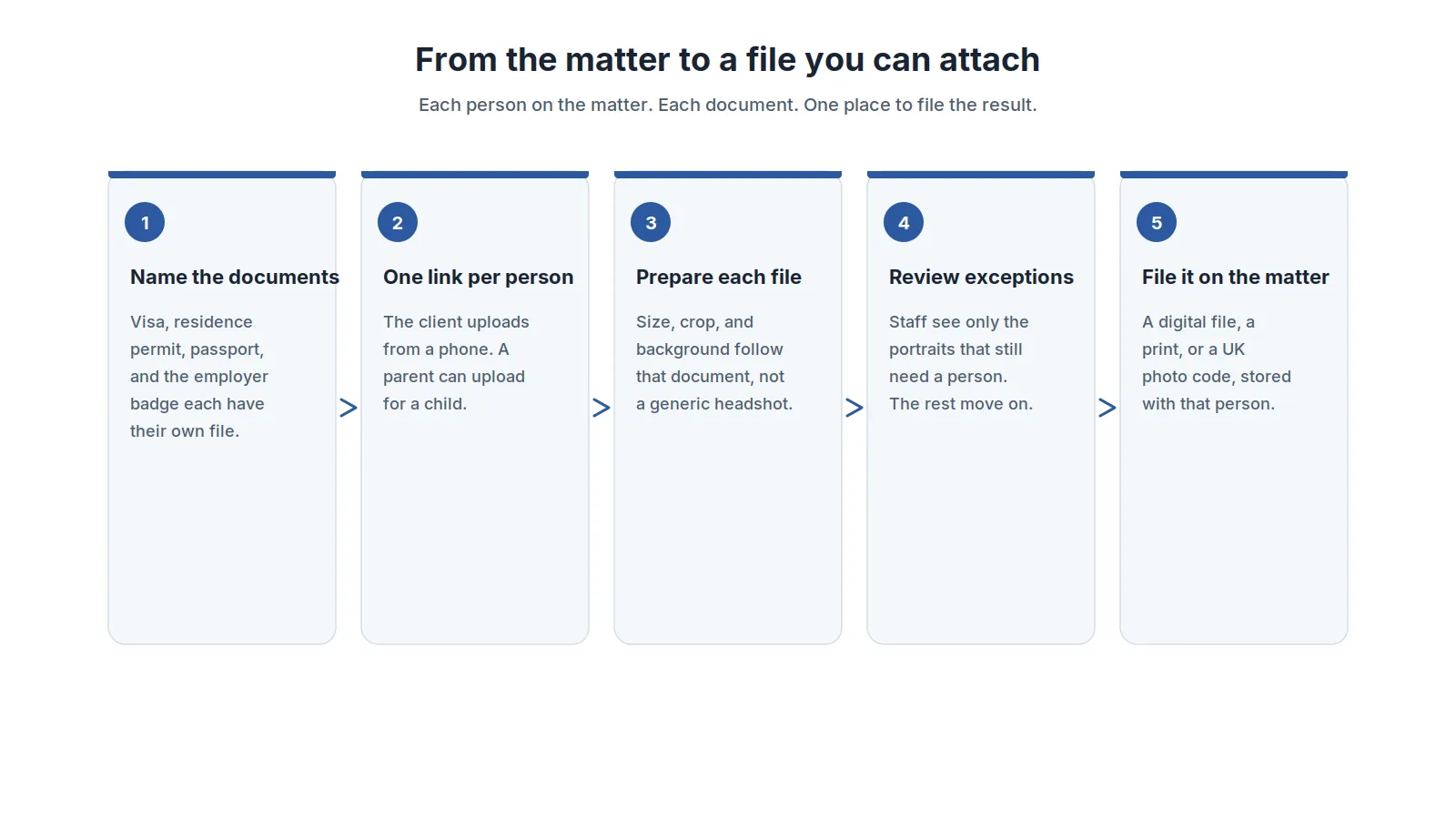
1. Name every photograph when the matter opens. A work visa, a residence permit, a passport, and an employer badge are separate files, even from one portrait. A spouse and each child are additional people, not extra crops of the principal. If a specification you file is missing, ask for it. Do not borrow another country’s size. The ID photo service documents 150+ passport, visa, and ID photo specifications.
2. Collect on a link that belongs to one person. Send it from the matter, in your firm’s or your company’s name. A parent or guardian uploads for a child, and the consent record stays in your system. One link, a plain retake message, and the file returned to you is the pattern the badge photo service uses for a card. Email support@idphoto.ai to pilot it. A studio, or a photo taken with a staff member present, is the fallback when a capture cannot be used.
3. Ask for a normal portrait, then apply that document’s background. One person, in color, face in focus, head upright, even light, both shoulders in the frame, glasses off when that document says so. The client does not need a white wall when the document uses a plain background. Background removal is that step on its own. Parents get the same note.
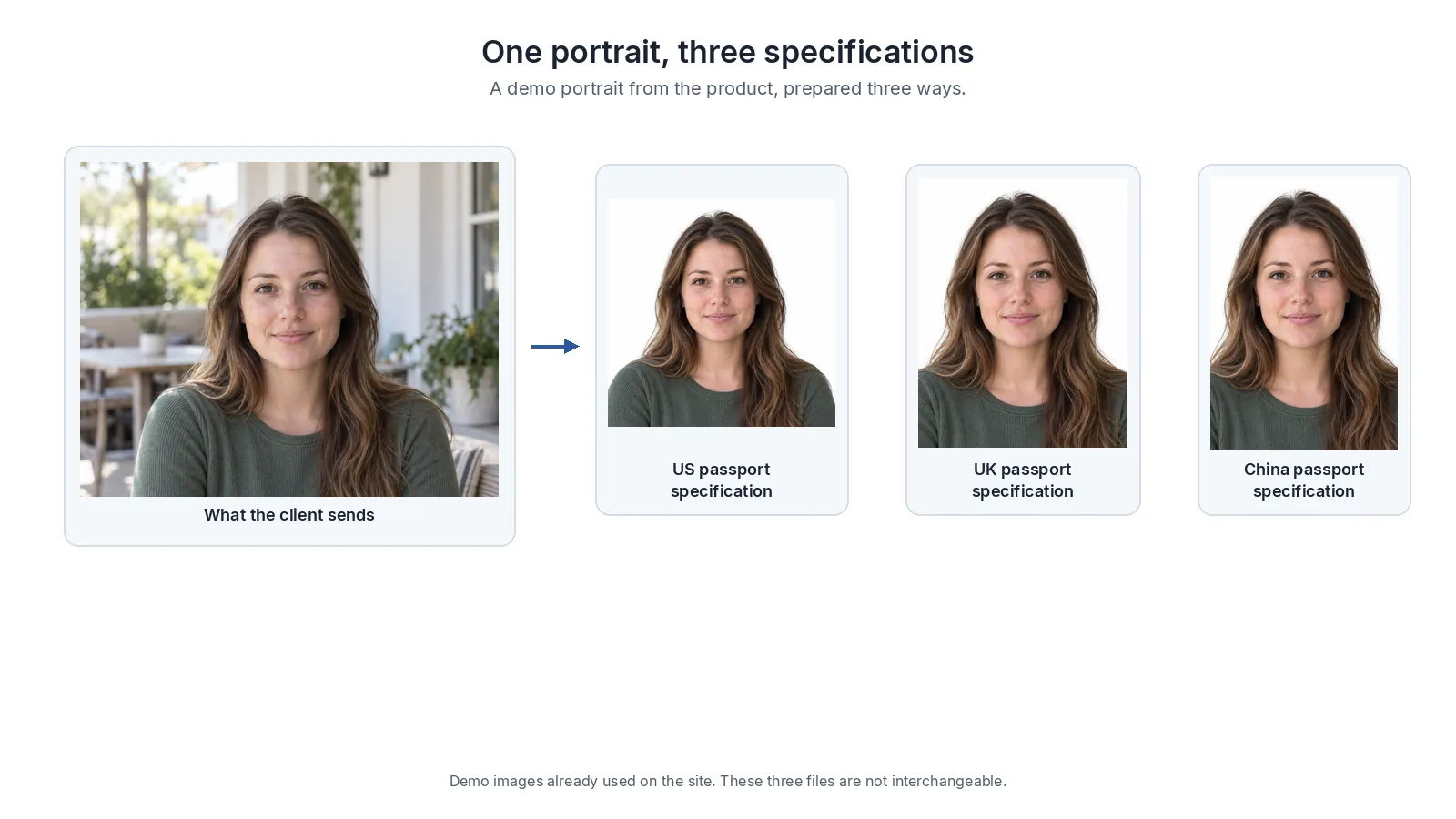
4. Prepare each document from that portrait. The service crops and sizes to the specification. The client does not choose a pixel size. A US passport photograph and a visa photograph are not interchangeable. A short-stay visa for France or Spain is often a Schengen visa photograph, not a French passport photograph. Prepare each one from the original.
5. Reject an unusable capture in the same task. The check catches a missing face, a rejected background, bad or uneven light, blur, a cut-off head or shoulders, disallowed glasses, lens glare, and a turned or tilted head. The client gets one instruction. The common mistakes guide sits behind that script. Where policy allows a correction that does not invent facial detail, photo enhancement can lift a dark portrait. The US Department of State tells applicants not to upload a photo created or edited with artificial intelligence or other digital tools. UK digital photographs must be unedited and should meet published GOV.UK photo rules. When the capture is poor, ask for another photograph.
6. Leave staff an exception queue. A clean check means those problems were not reported. It is not a consular review, and it is not a reason to tell the client the application will succeed. Do not crop away a religious head covering. Compare it with the published guidance for that document, and escalate when the guidance is unclear. On a replacement, a face comparison with the portrait already on the matter can flag a different person. The firm still decides what to file.
7. Attach the output the form needs. An online form gets a digital file on the matter, named with the person and the document. Paper gets a print sheet from the same preparation. Confirm mailing with support before you promise postage. For a UK passport on GOV.UK, prepare a photograph that meets GOV.UK photo rules and give the client a photo code. HM Passport Office retrieves the photograph and checks it. The code is not a decision on the passport, and this service is not an HM Passport Office product. Follow GOV.UK’s guidance for photographers. The photo-code page explains the handover. Do not describe your firm as an official channel.
8. Keep the original for the next document. Copy the portrait and each finished file into the matter, on your retention schedule. The idphoto.ai data privacy policy describes encrypted transmission, temporary storage from 2 hours to 14 days, an option to take the image so nothing is retained on the service, and compliance with the GDPR and the CCPA. Keeping photos in your own storage explains taking the file back before that window ends.
9. Treat the employer badge as its own handoff. The badge follows the employer’s template, not the visa. The badge photo service prepares the portrait to that card. Where the employer uses Workday or SAP SuccessFactors, the people who need a photo come from that HR system, and the finished file can be written back to the employee profile. The employee badge guide covers the HR side. Do not send the visa JPEG to the card printer.
10. Run a cohort as one portrait at a time. One unusable photo stays with that person. Batch ID photo preparation uses one specification and a retake list, so the rest of the cohort continues.
What to look for in a solution
Buy the step the team will live with on a filing week.
| What you need | What good looks like |
|---|---|
| A specification per document | Visa, permit, passport, and badge each have their own size, crop, and background, with a way to add one that is missing. |
| Rejection before the file is attached | Background, lighting, framing, glasses, and face position caught on upload, with one retake instruction and an exception list. |
| Collection inside the matter | One link per person, in your name. A parent can upload for a child. |
| Your case system | The finished file returns to the matter, labeled with the person and the document. It does not become a second client list. |
| A separate badge path | The employer card uses its own template. Workday or SAP SuccessFactors can take that file. The visa file stays on the matter. |
| Privacy and retention | Encryption in transit, a written retention window, and a way to keep the image in your own storage, including for children. |
| The output the form needs | A digital file, a print sheet when paper is required, and a UK photo code for a photograph that meets GOV.UK photo rules. |
For a UK passport, say the photograph meets GOV.UK photo rules. The authority still reviews it.
How to roll it out
Start with the documents you already file every week. Note whether each one needs a digital file, a print sheet, or, for a UK passport on GOV.UK, a photo code for a photograph that meets GOV.UK photo rules.
Pilot one practice group or one corporate account. Run real matters, and keep the previous path available for the first weeks. Name one owner who can decide, the same day, whether a matter stays on the new path. If counsel and a relocation company both touch the file, name which of them sends the link.
Teach the retake, not the crop. One person, in color, face in focus, even light, head upright, both shoulders in the frame, glasses off when that document requires it. Escalate a religious covering, a document you do not handle, or a face that does not match the person on the matter.
Read the exception list, then add the badge. Count second photographs, files attached without a manual crop, and applications returned because of the portrait. Add the employer’s card template only after HR has confirmed the size and the background. A public counter is a different offer: a ready-made Shopify store template with one-click setup, separate from the matter file. The Shopify passport photo guide walks through it. You still set the documents, the prices, and the page copy.
FAQ
Can an immigration firm or relocation company stop sending every client to a photo studio?
For many matters, yes. Each person uploads through a link tied to the matter, and the service prepares a file for each document. Keep a studio for captures that cannot be used.
Does the photograph you prepare replace a biometrics appointment?
No. The file is for the form or the portal. Many applications still require a visa application center, where the center takes its own capture.
How should a matter prepare a UK passport photograph that meets GOV.UK photo rules?
Prepare a photograph that meets GOV.UK photo rules. For an application on GOV.UK, give the client a photo code to type into the form. HM Passport Office retrieves the photograph and checks it. The code is not a decision on the passport, and the service is not an HM Passport Office product. UK digital photographs must be unedited.
Does a clean photo check mean the visa, permit, or passport will be granted?
No. A clean check means the capture problems it tests for were not reported. The embassy, immigration authority, or passport office still reviews the photograph and the rest of the application. Do not tell the client the document will be issued because the file looks right.
Can a relocation company put a badge photo on the employee record?
Yes, as a separate step from the visa. Where the destination employer uses Workday or SAP SuccessFactors, the badge portrait can be prepared to that card template and written back to the employee profile. The visa file stays on the matter.
A photo step that stays on the matter
idphoto.ai is the photo step for this workflow. The ID photo API prepares a portrait to the specification for that document, checks the capture, and returns a file your team attaches to the matter. Support can add a missing specification, including the template an employer badge uses. Integrations include Workday and SAP SuccessFactors for badge photos: the people who need a photo come from the HR system, and the finished file can be written back to the employee profile. A firm that also sells photos to the public can launch a ready-made Shopify store template with one-click setup, separate from the matter file.
Email support@idphoto.ai with the documents you file most, whether clients upload through a link or in your portal, how the file should return to the matter, and whether you also need print sheets, UK passport photo codes for photographs that meet GOV.UK photo rules, or a badge handoff to Workday or SAP SuccessFactors. The decision on the application stays with the authority that reviews it.