
Passport, visa, and badge photos need a plain background. The person in the source photo usually does not. This API removes that background and returns the cutout. It does not crop to a document size. Sizing, head position, and issue codes stay on the Passport Photo API. Uneven light on the face is a different call: shadow removal.
Background removal built for ID and passport photos
Most background tools are sold for product catalogs. The job here is narrower: one person, head and shoulders visible, edges clean enough that a later specification can place a white, blue, or other required background. The Background Remove API docs describe two endpoints and one request shape. Prefer a single-person portrait. Fine hair, motion blur, transparent objects, and a background close in color to the subject can weaken the edge.
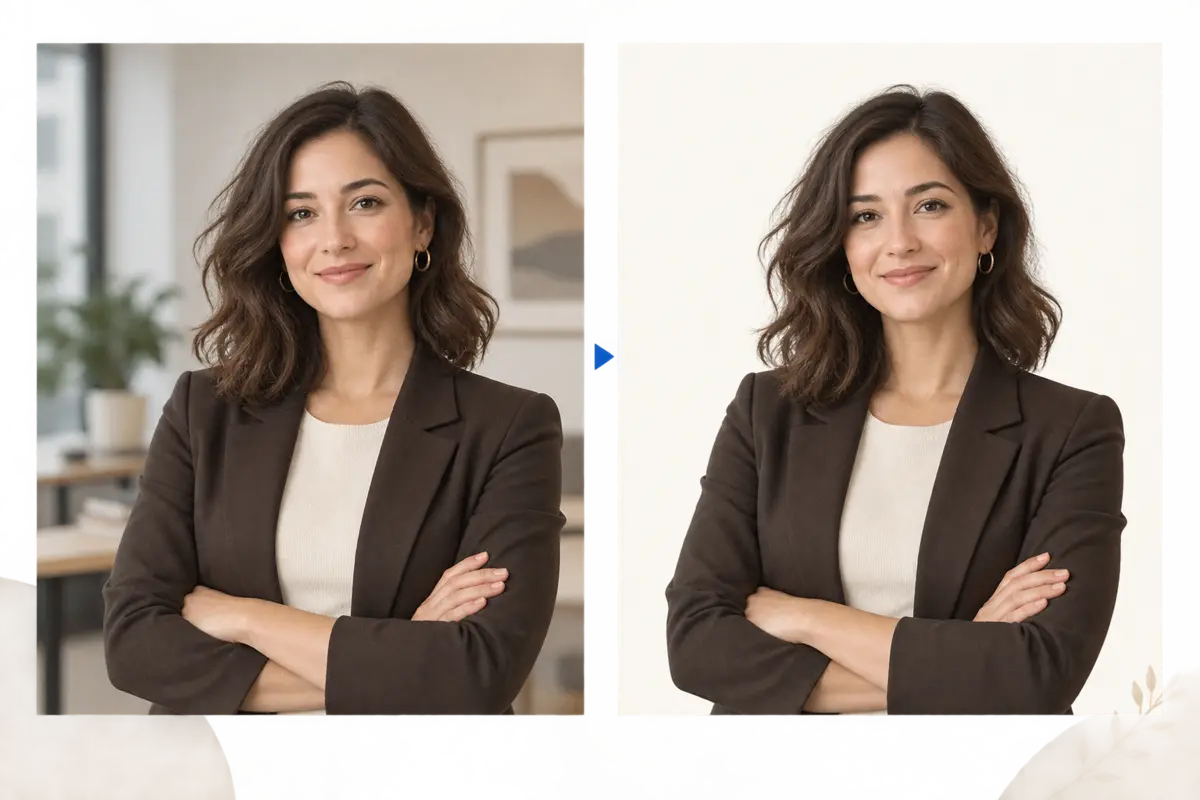
Quality mode and a faster endpoint
Both endpoints use the same fields. Pick the one that matches the step in your product.
| Endpoint | Use it when |
|---|---|
POST /v2/removeBackground | Edge quality matters more than speed. Typical for a photo the user will submit. |
POST /v2/removeBackgroundFast | Lower latency matters more. Typical for a live preview while the person is still in the camera flow. |
Hosts are https://api-us.idphotoapp.com and https://api-eu.idphotoapp.com. Send the key and secret from your server. The sample Python client in the docs uses a 120-second timeout and tells you not to retry a timed-out request until you know whether a result was created.
Background removal request and response
imageBase64 needs a data-URI prefix on this endpoint. outputFormat is JPEG or PNG. outputType is IMAGE_BASE64.
curl -sS -X POST "https://api-us.idphotoapp.com/v2/removeBackground" \
  -H "Content-Type: application/json" \
  -d '{
    "apiKey": "YOUR_API_KEY",
    "apiSecret": "YOUR_API_SECRET",
    "imageBase64": "data:image/jpeg;base64,...",
    "outputFormat": "PNG",
    "outputType": "IMAGE_BASE64"
  }'
{
"output": "iVBORw0KGgoAAAANSUhEUgAA..."
}output is Base64 with no data-URI prefix. Decode it before you save the file. A PNG result should be saved as .png.
PNG when you need transparency
Use PNG if the next step needs transparent pixels. JPEG cannot store transparency, so a JPEG result is a flattened image. This endpoint does not take a hex color, a replacement scene, or an alpha-mask-only flag. If the finished file needs a specific background color and crop, pass a portrait to the Passport Photo API with a specCode. The specification carries the background color. See photo spec codes and POST /v2/getIdPhotoSpec.
How apps, studios, agencies, and HR teams use the cutout
- Passport and visa apps. Show a cutout while the person is still on the capture screen, then call
POST /v2/makeIdPhotofor the real file. For a UK online application, the sized photo and UK passport photo code come from that second call, not from background removal. - Photo studios and booth software. Strip a cluttered booth background before you composite the studio backdrop you print. Keep the original capture if the issuer forbids altering the person.
- Agencies preparing client photos. Normalize a batch of source portraits to transparent PNG, then run each file through the specification you were asked for. One cutout does not set the head size.
- HR and security. Employee badge photos often need white or a corporate color. Remove the kitchen or office behind the person, then crop to the badge specification on the account.
What this call does not do
It does not choose a country, return issue codes, or decide whether a passport office will accept the photo. It does not change pose, expression, or glasses. Those are separate, and AI edits are not acceptable for US or UK passports. Read where an edit is allowed before you chain this cutout into a face correction.
Limits that show up on real uploads
- One image per request. A folder of employee photos is a queue you run, not a bulk field on this endpoint.
- Best results are a single person with the head and shoulders in frame.
- Hair edges, motion blur, glass, and a background similar to clothing or skin can leave a halo or a missed strand.
- Credentials and the image stay on your server. Do not log the full Base64 payload.
How to call background removal from your server
- Create a key in the dashboard and pick the US or EU host for the account.
- Encode the portrait as a data URI and call
/v2/removeBackgroundor/v2/removeBackgroundFastfrom your backend. - Decode
output. Keep PNG if you still need transparency. - If the product needs a compliant ID file, call the Passport Photo API with the
specCodefor that document. Map any photo issue codes to a retake, not to another background pass. - For storage choices, read the data privacy policy. This endpoint returns Base64, so you can avoid leaving the image on our service.
Why teams use this API for ID photos
The cutout is a step, not the product. You get a documented quality endpoint and a faster endpoint, a PNG when transparency matters, and a clean handoff to the same specification engine that produces passport, visa, and badge files. You do not have to pretend a general catalog tool understands 35 × 45 mm or a CR80 badge window.
FAQ
Does background removal produce a passport photo?
No. It removes the background and returns Base64. Cropping, dimensions, DPI, and issue codes come from the Passport Photo API and a spec code.
Which endpoint should a live camera preview use?
Use POST /v2/removeBackgroundFast when latency matters more than the final edge. Use POST /v2/removeBackground when the file is the one you will keep or submit.
Can I request a white or blue background in this call?
No. outputFormat is JPEG or PNG, and outputType is IMAGE_BASE64. PNG preserves transparency. A required background color belongs on the photo specification, which you apply with the Passport Photo API.
Will this fix hair, glasses, or a tilted head?
No. The docs say fine hair, blur, transparent objects, and similar colors can reduce edge quality. Pose, expression, and glasses are not fields on this request. Do not use an AI face edit for a US or UK passport photo.
Can I send a batch of images in one request?
No. Send one image per request and queue the rest in your own service. See the batch ID photo page for how repeated Passport Photo API calls work when you also need a specification.