

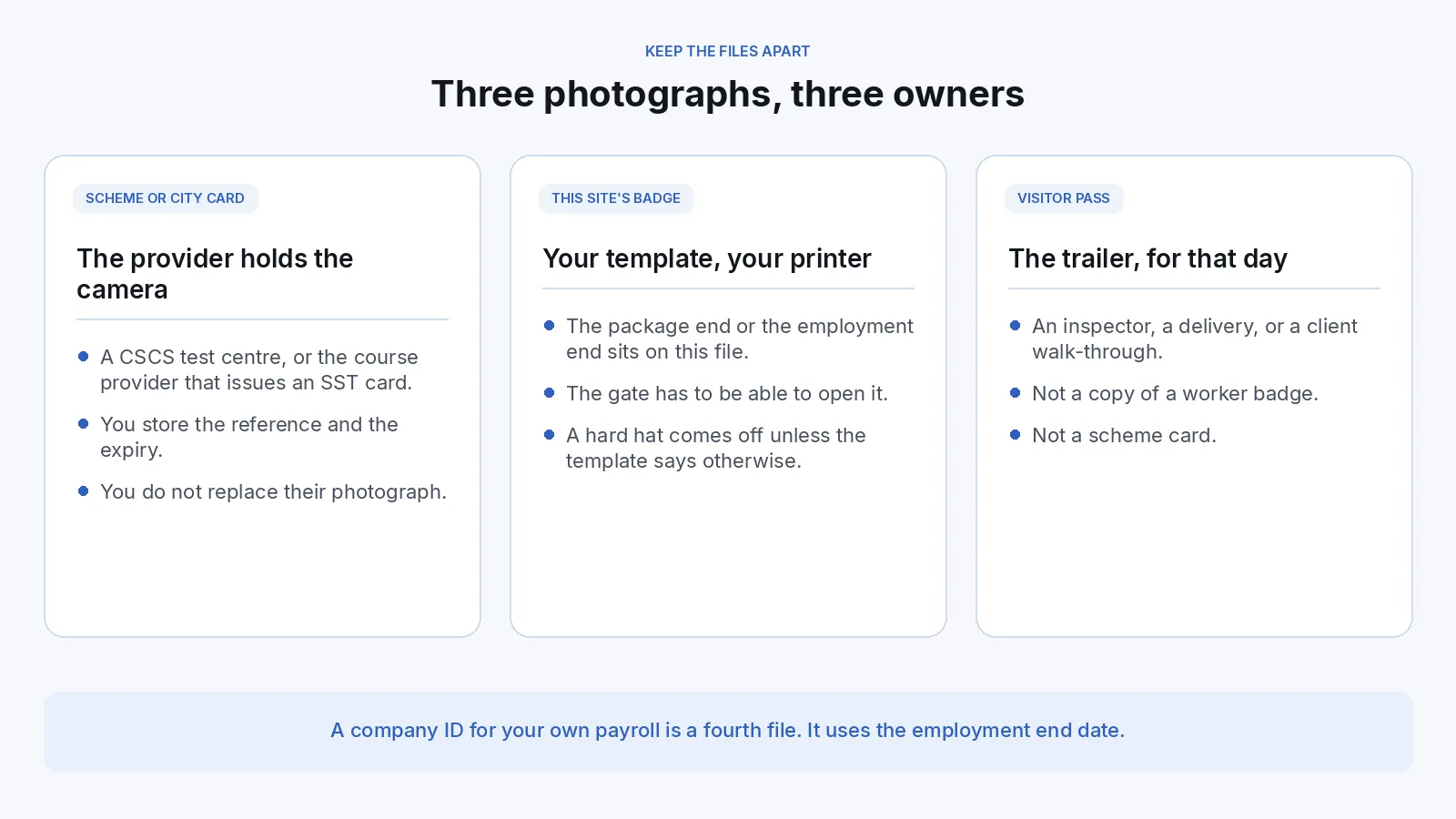
A general contractor can move a crew through the gate with a usable photograph when it keeps three files apart: the scheme or city card the contractor does not issue, the badge for this site, and the visitor pass. Name the file before anyone uploads, use the camera that file allows, and store an end date with the copy the site keeps. The scheme still issues its card. The gate still decides who comes through.
This guide is for site operations, access control, and the person who prints a badge when a crew arrives. Payroll in Workday or SAP SuccessFactors follows the HR badge guide. A staffing firm follows the staffing guide. A guarding company follows the security guide. A hospital project follows the hospital badge guide. Starting from $0.20 per photo.
What does one photograph for every card cost a site?
The cost is a crew at the fence, a scheme application sent back, or a card that still looks current after the package has ended. One JPEG cannot serve the scheme, this site, and a visitor. The table uses published UK and New York City rules, plus your own template for every other card. Read the current page before you copy a step. CSCS and the New York City Department of Buildings are not IDPhoto.ai customers.
| File | Who holds the camera | What goes wrong if you substitute |
|---|---|---|
| UK CSCS card, when this site asks for one | The CITB test centre or the CIC course, in most cases. Another photograph only if that image is poor quality, or an unaltered upload on an approved alternative. | The wrong card for the role may mean refused entry. CSCS Cards Limited publishes £36. The apprentice card is free. Other schemes set their own prices. |
| New York City SST card, on a site Local Law 196 covers | A registered course provider, through Training Connect, which also receives a photograph of the person. | 40 hours for workers, 62 for listed supervisors, five years from issuance. An expired card cannot be used on a jobsite during the renewal window. Your badge is a different file. |
| This site’s worker badge | Your template: a phone link, or the camera at the trailer. | A hard-hat selfie the gate cannot match, or an end date that lives only in the scheduler. |
| Visitor or inspector pass | The trailer, for that day or that visit. | A worker’s old file printed as a day pass. |
| Visa or passport, when a posted worker needs one | That document’s own capture. A UK passport photograph must meet GOV.UK photo rules. | Keep it on the immigration file. Leave it off the badge. |
CDM 2015 regulation 13(4) requires a suitable site induction and the necessary steps to prevent access by unauthorised persons. HSE’s guidance says authorisation can cover the whole site or only certain areas. Badge size, and whether the site asks for a CSCS card, are choices you write down. The photograph shows who you authorised, and until when.
How do contractors collect site photos today?
Most trailers still run on a webcam, a shared inbox, and one coordinator. A subcontractor texts a selfie from the cab, hard hat on. Someone crops it once for the scheme checklist, the site badge, and the visitor log. The end dates sit in three places, so a reprint uses whichever file is newest, and the crew waits at the fence.
What does a split workflow look like?
Name the file before the first link goes out. One person can hold more than one file. Each file has its own camera and its own end date.
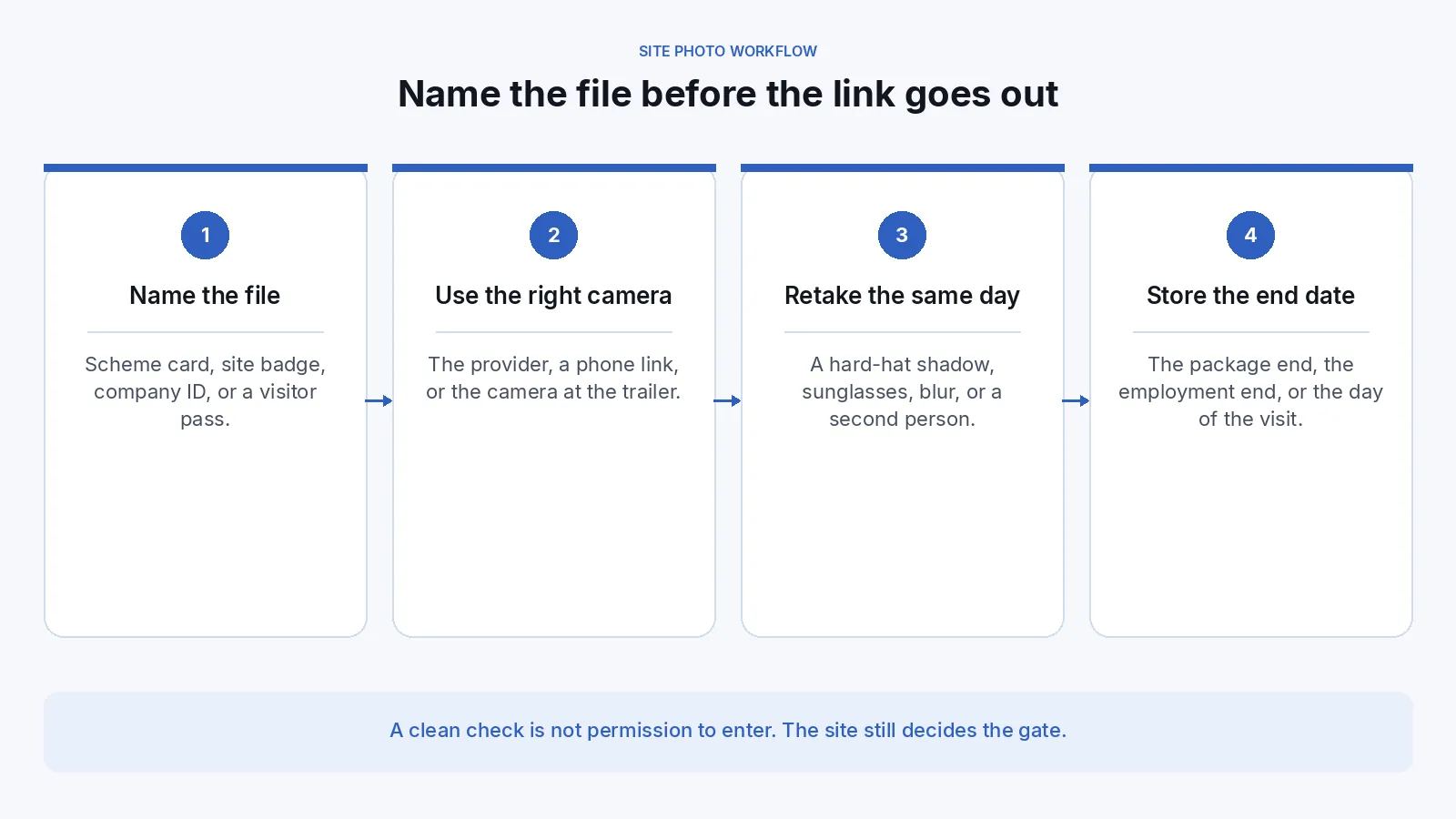
1. Write down who is allowed to hold the camera. Use the row above. Collect the site photograph at induction, which regulation 13(4)(a) already requires, so the file exists before the crew is due. The scheme’s camera stays on the scheme’s card.
2. Sort people by the record that already owns them. Build the checklist on the project record. Leave payroll, the staffing assignment, and the scheme account where they already live.
| Who | Where the record lives | What to do with the photo |
|---|---|---|
| Direct employee | The company record, and HR when Workday or SAP SuccessFactors already lists them | Company template and employment end date. A second file when this project ends sooner. Roster sync is available per request. |
| Subcontractor’s worker | The package on this project | This site’s template and the day the package ends. Leave them off payroll. |
| Labour from a staffing firm | The assignment | The card you issue, with the assignment end date. The firm keeps its own file. |
| Visitor, inspector, or a delivery through the pedestrian gate | The visitor log | A fresh capture for that day. Leave the worker badge where it is. |
| Worker who also needs a visa or a passport | That document’s own file | The immigration guide. A UK passport photograph meets GOV.UK photo rules and stays unedited. |
3. Collect the site and company files on one link, or on a camera at the trailer. The badge photo service can email a unique link. The person uploads from a phone with no extra account, and the link expires after use. That portal is available per request. Contact support@idphoto.ai. Keep the trailer camera for a rejected capture. The scheme path keeps its own camera. People you already employ can use the same capture on the employee badge page.
4. Match the face, and reject a bad capture in the same visit. One person, in colour, in focus, even light, eyes visible. A religious head covering can stay when the face is clear and the template says so. A hard hat, a hood, and sunglasses come off unless the template says otherwise. Background removal and photo enhancement apply only when that card’s policy allows them. Leave a CSCS upload unaltered. A UK passport photograph must meet GOV.UK photo rules, stay unedited, and can be retrieved with a UK passport photo code. HM Passport Office still decides. Send the common mistakes guide back while the person is there. A face-mask check is available per request. An AI headshot is a different file.
5. Write each file to the record with the date it should stop. A clean check means those capture problems were not reported. The scheme, the city, and the gate still decide. On a replacement, face comparison returns a match decision and a similarity score. Liveness detection is available per request on a phone capture. See biometric verification. The supervisor still matches the person to the card. Take the copy back, or use a temporary link of 2 hours to 14 days. That window is not the retention schedule.
6. Run a batch only inside one specification. Batch preparation fits a week of inductions on this site’s template and returns a retake list. The scheme photograph, the company ID, the site badge, and the visitor pass stay in separate batches.
Many site printers take ID-1 stock, nominally 85.60 mm by 53.98 mm under ISO/IEC 7810. The photo window is smaller. Measure it before the first link. Keep a Social Security number off the card. The Department’s course-provider notice says an SST card number cannot be one. Confirm the current notice before you copy a field.
Where do site badge photos usually fail?
These breaks show up after the crew was due, or when the gate asks for a file the trailer cannot open.
| What fails | What to change |
|---|---|
| One selfie is cropped for the scheme card, the site badge, and the visitor pass | Split the files before the link goes out. Each file names its camera and its end date. |
| A hard hat, sunglasses, or a truck-cab shadow hides the eyes | Retake at the trailer the same day, on the template’s background, with the face clear. |
| The CSCS upload was background-removed or sharpened | Leave that photograph unaltered. Background removal belongs on a template that allows it. |
| A site badge is handed over as an SST card | The provider issues that card and keeps the record for at least seven years. Store the reference and the expiry. |
| The package has ended and the badge still looks current | Store the end date with the photo, and deactivate the card that day. |
| The only copy sits in a coordinator’s inbox | Store it where the gate and the trailer can open it on the day of the shift. |
| Two projects share one JPEG and one end date | Prepare the second template again, with that project’s end date on that file. |
What should a contractor require from a vendor?
Site operations and the person who owns access can share one shortlist. The scheme and the city still issue their own cards.
| What you need | What good looks like |
|---|---|
| A specification per card you print | Size, crop, background, and glasses. A missing template can be added. See sample specifications. The scheme card sits outside this list. |
| A block on forbidden edits | An applicant-supplied CSCS photograph, and a US or UK passport photograph, stay unedited. A corrected portrait runs only where the site template allows it. See when that tool fits. |
| Rejection before a manual crop | Face, light, blur, framing, glasses, and a turned head, while the person is still at induction. A face-mask check when you ask for it. |
| A path for people not yet at the trailer | One link per person, in the company’s name, no extra account, expired after use. The trailer camera stays for a rejected capture. |
| The site record | The file returns with the date that card should stop. Workday or SAP SuccessFactors sync is available per request for people those systems already list. |
| A check a supervisor can explain | Face comparison and liveness detection are available per request. The supervisor still matches the person. |
Who may see a worker’s photograph?
The worker, the trailer, and the gate may see the site file. The subcontractor’s supervisor sees that package when the contract says so. The scheme sees its own card. A publicity photograph uses a separate consent. Government ID numbers stay in the system that already holds them.
In the UK and the EU the portrait is personal data under the GDPR. In California it is personal information under the CCPA. The data privacy policy describes encrypted transmission, temporary storage from 2 hours to 14 days, or taking the image so nothing is retained on the service, and compliance with the GDPR and the CCPA. US and EU processing are available. Other regions are available per request. On a covered New York City site, the provider keeps the SST record for at least seven years. The trailer inbox does not replace that record.
How do you roll this out on one site?
Write the file rule before the first link. For one project, name the site template, the scheme cards that project asks for, and the visitor pass. Write the date that stops each file, and measure the photo window on that trailer’s printer.
Run one week of inductions on the site template only. Name one owner who can decide, the same day, whether a person stays on the new path. A rejected capture uses the trailer camera before the person leaves. Print one card on that printer, or confirm print and mailing with support before you promise a card in the post. Print and mailing is available per request. Leave scheme postage with the scheme.
Add a second project after a write has held. Prove a clean upload, a retake, and a write that fails once and is retried. Then print one badge on the second printer. Open Workday or SAP SuccessFactors for direct employees only after support has confirmed that connection. The Shopify store template, with one-click setup, is available per request for a public counter. It follows the Shopify guide and stays off the worker record.
What do site leads ask?
Can a contractor upload its own crop as the CSCS photograph?
In most cases, no. The card uses the photograph from the CITB test or the CIC course. CSCS terms allow another photograph only when that image is poor quality, and an approved alternative must meet the photo requirements and stay unaltered. The site badge is a separate file.
Does a site badge replace a New York City SST card?
No. On a site Local Law 196 covers, the course provider issues the card. Workers need at least 40 hours, listed supervisors need 62, and cards last five years. An expired card cannot be used on a jobsite during the renewal window.
Should the worker wear a hard hat in the site photo?
Only when the written template says the gate will match the person that way. The eyes have to be visible. On a CSCS upload, follow CSCS’s head-covering rule and leave the file unaltered.
Can a subcontractor submit a badge photo without visiting the trailer?
Yes. Send one link, with no extra account, and expire it after use. It is available per request. Contact support@idphoto.ai. Keep the trailer camera for a rejected capture. The provider still holds the camera for its own card.
What if the labour comes from a staffing agency, or the project is inside a hospital?
The firm keeps its own file under the staffing guide. You still print this site’s badge with the package end date. A hospital follows its own badge path. A guarding company follows its licence and company ID.
Can the same portrait go on a visa or a UK passport?
Use a separate file, on the immigration path. A UK passport photograph must meet GOV.UK photo rules and stay unedited. HM Passport Office still decides. A US passport photograph follows the Department of State and stays unedited.
How does idphoto.ai fit this workflow?
idphoto.ai prepares a portrait to the company or site template you name, checks the capture, and returns a file for the project record or the card printer. The scheme issues its card. The gate decides who enters. Support can add the card you print. The catalog covers 300+ specifications across 200+ countries when a worker also needs a visa or passport file. Starting from $0.20 per photo. A UK passport photograph, when one is required, must meet GOV.UK photo rules. A CSCS photograph the applicant supplies stays unedited.
The self-service link, Workday or SAP SuccessFactors sync, print and mailing, liveness detection, a face-mask check, another processing region, and the Shopify store template are each available per request. Email support@idphoto.ai with the card designs, which scheme cards the site asks for, how the file returns, and any visitor template that differs from the worker badge.