

A school district keeps a photograph a front desk can match by holding three files apart: the staff badge, the substitute or volunteer card, and the contractor or vendor pass. Name the file before anyone uploads, capture it before the person is with students, and store an end date on every card the district prints. A fingerprint enrollment photograph, a government photo ID, and a Form I-9 portrait stay on the path that issued them.
Year-round employees follow the employee badge page and the HR badge guide. Agency substitutes follow the staffing guide. Contract security follows the security guide. A build crew follows the contractor guide. Student cards follow the university guide. A visa file follows the immigration guide. Starting from $0.20 per photo.
What does one shared photograph cost a school district?
The cost shows up when the front office is closed and the campus is not. A Monday substitute arrives before anyone can print a badge, and one crop is asked to serve the staff badge, the fingerprint packet, and a volunteer sticker.
The National Center for Education Statistics counted 6,795,470 full-time-equivalent staff in public school systems in the 50 states and the District of Columbia in fall 2022, including 3,228,895 teachers. That January 2024 table leaves out private schools, contractors, and volunteers. It is not a count of badges.
| File | Who holds the camera | What goes wrong if you substitute |
|---|---|---|
| Staff badge | A link before day one, or the front office. | A hallway selfie, or a card with no end date. |
| Substitute or volunteer card | That assignment’s template, before the person is with students. | Last year’s card still opening a door. |
| Contractor or vendor pass | Before the crew is on campus. In Florida, the badge in section 1012.467. | A five-year Florida badge left as a door key after the work order ends. |
| Fingerprint photograph | The state enrollment. Texas may include a photograph in that packet. | Sending the badge crop to the department, or keeping the packet because the badge is active. |
| Form I-9, for people the district employs in the United States | The employee chooses the documents. A school badge is not on the Lists of Acceptable Documents. | Filing the badge as proof of identity, or specifying which document to bring. |
The Handbook for Employers requires Form I-9 for someone you hire in the United States for pay. Section 2 is due within three business days, or on the first day when the job is shorter. Skip it for a contractor, a staffing agency’s employee, and a volunteer. On an E-Verify case, compare the photo E-Verify displays with the document, not with the badge.
Which file owns this photograph?
The district sets the crop for the window it prints and still decides which door the card opens. Read the section that applies before you name the file. A charter school named in the same statute uses the same split.
Florida contractors. Section 1012.467(8) says the district issues a statewide badge that must bear a photograph. It is for a paid noninstructional contractor who is screened under that section, is a U.S. citizen or permanent resident, and is 18 or older. Every district recognizes it. It must be visible on school grounds and is valid for five years. After the arrest notice in subsection (6), it goes back within 48 hours. Section 1012.468 exempts a brief delivery, line-of-sight supervision, and a fenced site where students are not permitted. Those exemptions do not get this badge. Subsection (7) says it is repealed July 31, 2026, so leave that shared-results website out of a 2026–27 workflow. Deactivate local doors when the work order ends, even if the badge is still valid somewhere else.
Texas. The Texas Education Agency requires a fingerprint-based check before work for certified educators, aides, substitutes, and non-certified employees hired on or after January 1, 2008. Education Code 22.0833 and 22.0836 say that submission may include photographs. That sitting is not the staff badge. Section 22.0834 covers certain contractors with direct student contact, with a fence exception. An escorted emergency entry is not a badge. Section 22.0835 says a student teacher or volunteer shows a U.S. government photo ID first, except a parent, guardian, or grandparent, someone an employee accompanies, or a single event. Section 22.08391 requires destruction of that packet, including fingerprint records, within a year. Keep the badge.
Employees and students. Under 34 CFR 99.3, an ordinary employment record is not an education record when it relates only to the person as an employee and is not available for another purpose. The FERPA FAQ says the same. A student employed because of student status stays on the student file. A public directory is a separate permission. An AI headshot can sit there. It stays off the badge.
A U.S. visa follows the Department of State and stays unedited. A UK passport photograph meets GOV.UK photo rules, and HM Passport Office still decides.
How do school districts collect these photos today?
Without the split, one inbox holds a new teacher, a Thursday substitute, a weekly volunteer, and a roofer. When the office is out, the door list has no photograph, and a summer crew’s own sticker is treated as access.
What does a split workflow look like?
Name the file before the first link goes out. Every card stores an end date, and a hallway is the wrong place to take the photograph.
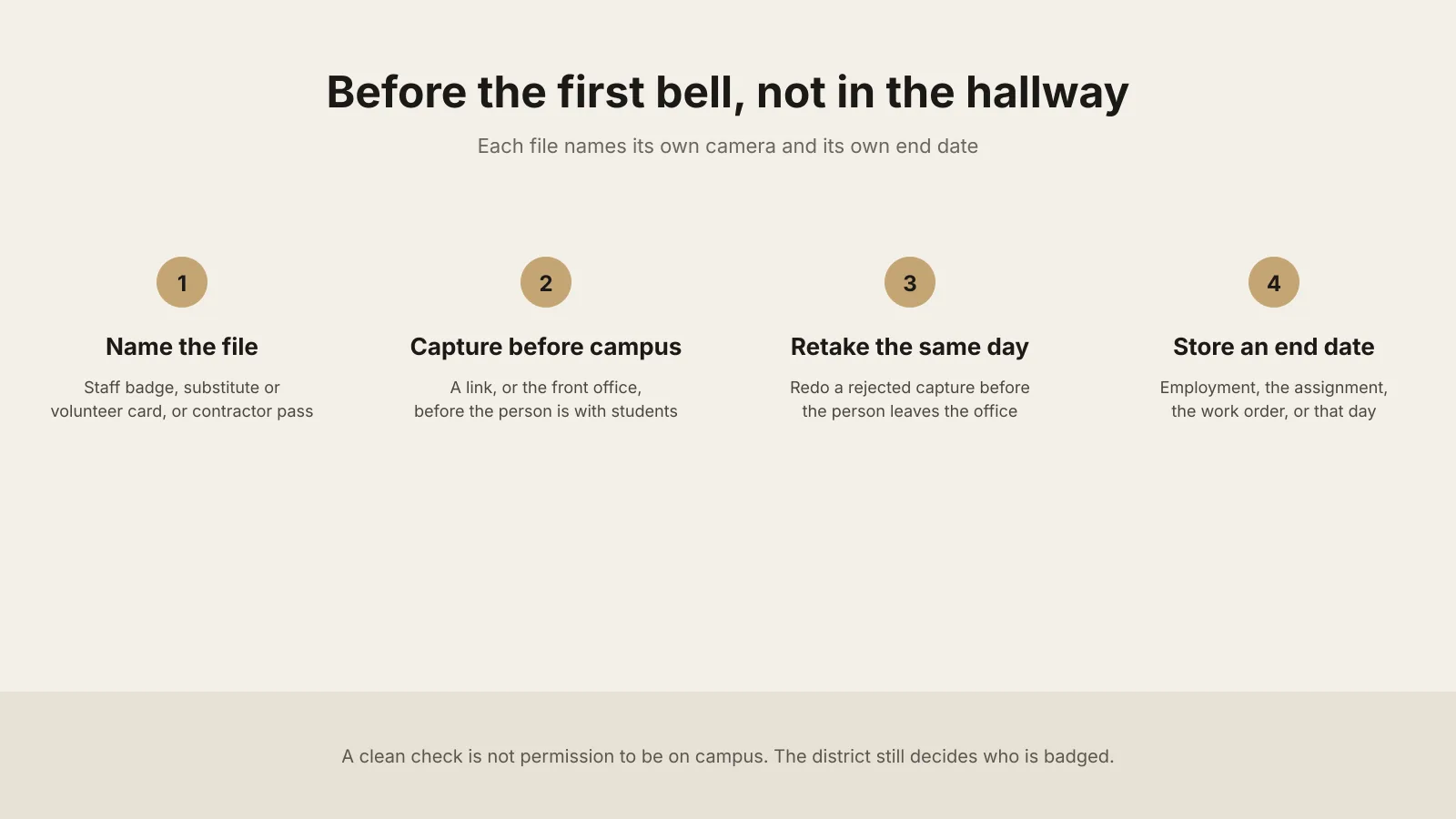
1. Write down who holds the camera. Collect each photo before the person is with students. Keep a retake camera at the front office, and do not shoot where students are in the frame.
2. Sort people by the record that already owns them. The staff badge ends with employment. A substitute, a returning volunteer, or a student teacher ends on the date you stored. A single event ends that day. Agency workers follow the staffing guide. A contractor pass ends with the work order. Security follows the security guide. A build crew follows the contractor guide. Each card names its campus and its doors.
3. Collect the file on one link, or at the front office. The badge photo service emails one link per person, with no extra account, expired after use, available per request from support@idphoto.ai. It works without a district email. Keep the three populations in separate batches, and send the link before the first day on campus.
4. Reject a bad capture in the same visit. One person, in color, in focus, eyes visible. Background removal and photo enhancement apply only when the template allows them. A fingerprint submission, a visa, or a UK passport photograph stays unedited. See when a corrected portrait fits. A face-mask check is available per request.
5. Write the file back with its date. The Florida five-year badge is not the door end date. The Texas one-year clock is the fingerprint packet. On a replacement, face comparison checks the new capture. Liveness detection is available per request. Take the copy back, or use a temporary link of 2 hours to 14 days. Deactivate the card on its date.
6. Batch one hiring class on one template. Batch preparation returns a retake list before new-teacher week and the August substitute pool. Change the card color from the previous school year.
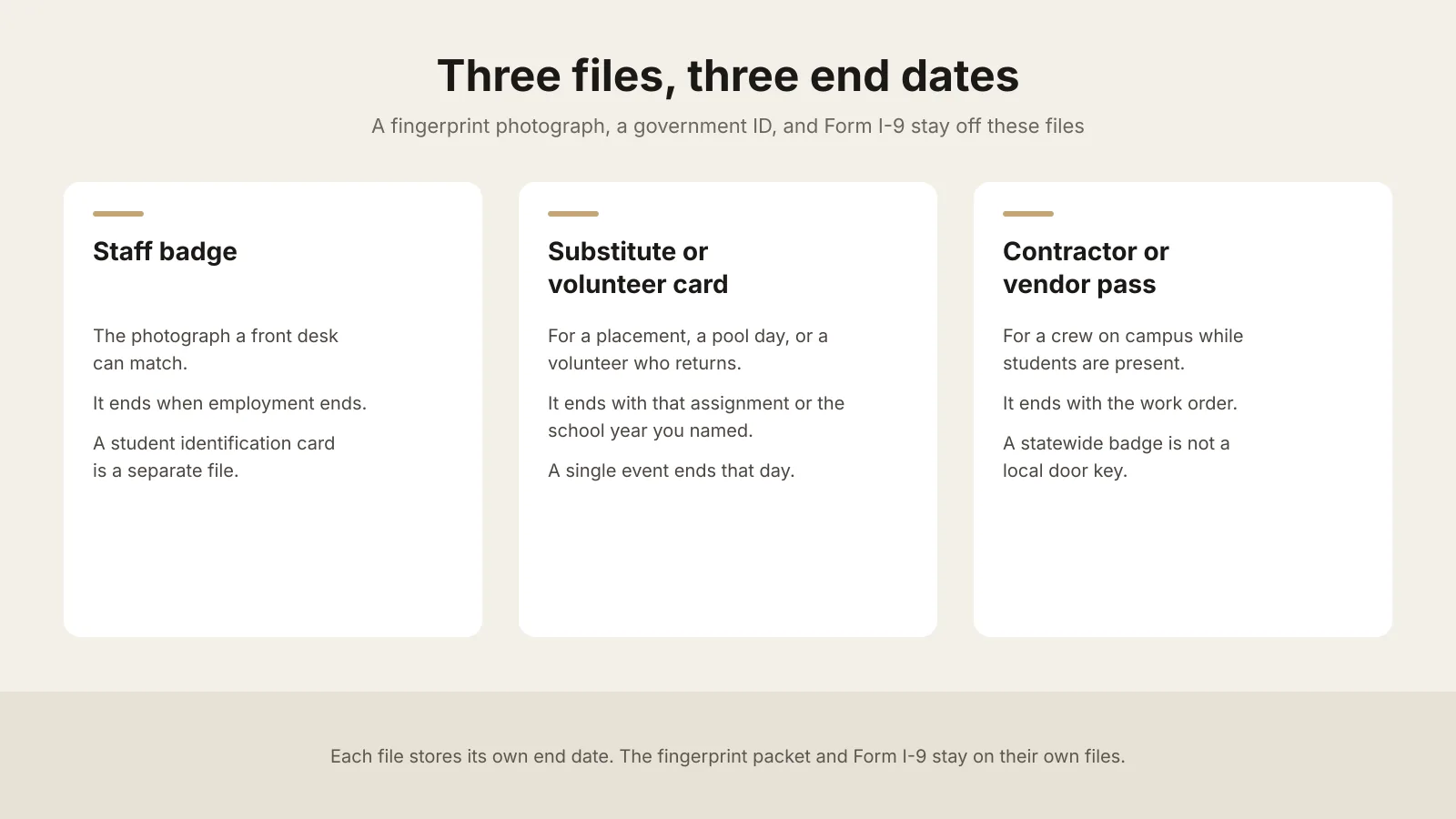
Many printers take ID-1 stock, nominally 85.60 mm by 53.98 mm under ISO/IEC 7810. Measure the window you actually print, and keep a license number and a student ID number off the face of the badge.
What should district HR and campus operations require from a photo service?
| What you need | What good looks like |
|---|---|
| A specification per card you print | Size, crop, and background for each window, and a second window when the cards differ. See the spec code reference. A fingerprint photograph, a visa, and a government ID sit outside this list. |
| Rejection in the same visit | Face, light, blur, and framing at the front office. A fingerprint photograph and a passport photograph stay unedited. |
| A path before the first day | One link per person, no extra account, expired after use, including someone without a district email. A camera at the front office for a retake and a walk-up. |
| The record that owns the person | The file returns with its end date, the campus, and the doors. Workday or SAP SuccessFactors sync is available per request for employees already in those systems. |
| A check a front desk can explain | Face comparison and liveness detection are available per request. The district still decides who may be on campus. The card still deactivates on its date. |
How do you roll this out across campuses?
Write the file rule before the first link. Name the templates, the end dates, and which doors each card opens. Say which file is the Florida contractor badge and which packet follows the Texas one-year clock. A student card stays off this rollout.
Run one campus for one week. Use a quiet week. Print two staff badges, one substitute or volunteer card with a date you can point to, and one contractor pass that ends with that crew. Include one person with no district email. Print on the campus printer, or confirm print and mailing before you promise a card in the post. Print and mailing is available per request.
Add the next campus after a write has held. Prove a clean upload, a retake, and one failed write that is retried. Then open the August substitute pool. Connect Workday or SAP SuccessFactors for employees only after support confirms it.
Where do these photos usually fail?
| What fails | What to change |
|---|---|
| A Monday substitute waits for the office, or someone else’s card is used | Send the link before the assignment. Keep a camera at the front office. |
| The portrait is a hallway selfie, or students are in the background | Retake at the front office. Do not shoot where students are in the frame. |
| Last year’s card, or a finished work order, still opens a door | Deactivate the card on its date. A Florida badge can stay valid for five years and still lose its local doors when the work order ends. |
| A driver’s license or a fingerprint photo is filed as the badge | Print the badge from its own capture. The Texas packet follows section 22.08391. |
| A fenced project opens onto a hallway, or a delivery becomes a week on site | The exception lasts only while its conditions hold. Move the person onto the contractor file first. |
| The badge photo is on the school website, or a student worker is on the staff template | A public directory is a separate permission. A student employed because of student status stays on the student file. |
Who may see a photograph?
The person, human resources, the principal, and the front desk may see the file that role needs. Keep the fingerprint packet out of the badge folder. In Texas, section 22.08391 limits release of that packet and sets the one-year clock. Keep the badge off the public website unless a separate permission names that use. GDPR Article 5(1)(e) and the CCPA apply where those laws apply. The data privacy policy covers encrypted transmission, a temporary link of 2 hours to 14 days, or taking the image back. US and EU processing are available. Other regions are available per request.
What do district HR and campus leads ask?
Does every teacher, substitute, volunteer, and contractor need a photo on the credential?
The rule you operate under decides. Where you print a photograph, measure the window. Florida’s section 1012.467 requires one on the statewide contractor badge it describes.
Can a substitute keep last year’s card for the new school year?
No. It ends on the date you stored. The next year is a new card.
Can a new hire or a Monday substitute send a photo before they reach campus?
Yes. One link, no extra account, expired after use, available per request from support@idphoto.ai. Keep a camera at the front office.
Can the fingerprint photograph, a driver’s license, or Form I-9 be the badge?
No. Those stay on the file that issued them. The badge crop stays on the credential you print.
What does Florida require on a noninstructional contractor badge?
The district issues a badge that bears a photograph, valid for five years and visible on school grounds. Exemptions in section 1012.468 do not receive it. Local doors still end with the work order.
How long does Texas let a district keep the fingerprint packet?
Section 22.08391 says the requestor destroys that subchapter packet, including fingerprint records, within a year of receipt. The staff badge is a different file.
Is a staff badge a FERPA education record?
Not when it is an ordinary employment record, relates only to the person as an employee, and is not available for another purpose. A student employed because of student status stays on the student file.
What does preparing the photograph cost?
It starts at $0.20 per photo, separate from a printer, a fingerprint fee, and a government fee. The catalog covers 300+ specifications across 200+ countries.
How does idphoto.ai fit this workflow?
The idphoto.ai API is the photo step. It prepares a portrait to the template you name, checks the capture, and returns a file for the staff record, the substitute or volunteer record, the contractor record, or the printer. The district decides who receives a card and which door it opens. A fingerprint appointment, Form I-9, and a visa stay on their own path. A UK passport photo code retrieves a photograph that meets GOV.UK photo rules, and HM Passport Office still decides. Preparing a photo starts at $0.20, from a catalog of 300+ specifications across 200+ countries.
Templates, the self-service link, Workday or SAP SuccessFactors sync, print and mailing, liveness detection, a face-mask check, another processing region, and the Shopify store template with one-click setup are each available per request. The store template stays off the access record. Email support@idphoto.ai with the card designs, which doors each pass opens, and how the file returns. Request samples stay in the API docs.
Where are the rules cited in this guide?
- Florida section 1012.467 and section 1012.468
- Texas Education Code chapter 22, including sections 22.0833, 22.0834, 22.0835, 22.0836, and 22.08391, and the Texas Education Agency fingerprinting page
- 34 CFR 99.3, NCES Digest table 213.10, Form I-9, E-Verify photo matching, GOV.UK photo rules, and ISO/IEC 7810