
An exam organization can match a candidate from registration to the seat, in a test center or in a remote session, when the registration portrait, the admission ticket, and the check-in capture stay on one chain. Check that portrait before the registration is accepted, place the accepted file where staff will see it on the day, and compare it with the person who arrives. The government ID stays on the document that issued it. The exam body still decides who may sit and whether a score stands.
This guide is for exam boards, licensing and certification bodies, test-center operators, and the teams that run remote proctoring. A campus card follows the university ID page and the university guide. A learner photograph a driving school keeps follows the driving-school page. People who staff the center follow the HR badge guide. A passport or visa photograph follows the immigration guide.
What does a rejected candidate photo cost an exam organization?
The cost shows up as a registration that cannot close, a support ticket in the week the window ends, a candidate turned away at the door, and a seat that has to be offered again. A remote session adds a check-in that never starts, because the live face and the ID were never stored on the same record. An integrity review after the sitting leaves a reschedule, or a score the board has to review.
The file is large even for one program. On September 29, 2026, College Board reported that more than 1.95 million students in the class of 2026 took the SAT. A manual queue cannot review a file of that size in the week a window closes. College Board is not an IDPhoto.ai customer.
| File | When it is made | Who uses it on the day | What fails when the files are mixed |
|---|---|---|---|
| Registration portrait | During registration, on a link or at a counter. | Staff at the door, and the remote check-in. | A group photo, a filter, or a scan of a passport page stored as the exam file. |
| Admission ticket or hall ticket | After the portrait is accepted. | The candidate, and the person at the door. | A ticket printed from a file staff cannot match, or a ticket with no portrait when the roster also has none. |
| Test-center check-in capture | At the door, by the center. | The invigilator, next to the registration portrait and the ID the candidate shows. | A capture that is never written back to the candidate record. |
| Remote check-in | In the session, before the exam starts. | The proctor, next to the registration portrait and the ID. | A new photo that lives only inside the proctoring tool. |
| Government ID | The issuer's own capture. | Shown on the day. The photograph on it stays with that document. | Copying the ID portrait into the exam file, or sending the exam crop to a passport office. |
Published programs already separate these moments. College Board's SAT photo requirements say candidates upload a photo at registration and that staff compare it with the photo ID. The ID requirements page says staff compare the admission ticket and the photo ID with the roster. The testing rules allow a photo change up to five days before the test. A note on the admission ticket says the ticket will not show the photo, and that staff use the registration file, so the roster still has to carry it.
ETS takes a photo at GRE test-center check-in and verifies the ID. The document rules stay on the GRE ID page. Pearson VUE takes a center photo and stores it with the results. OnVUE check-in includes photos of the candidate and of the ID. UPSC matches a live photograph with the uploaded photograph before the application can continue. IELTS takes a photograph at registration to confirm the person who sits, and the test-day page requires the same identification document used at booking. Each page states that program's own rules. College Board, ETS, Pearson VUE, UPSC, and IELTS are not IDPhoto.ai customers.
How do organizations collect candidate photos today?
One registration form accepts any file. The queue is reviewed after the deadline, often by people who also answer the phone. A sunglasses selfie, a photograph of a printed photograph, and a passport scan sit in the same folder. Someone crops them the night the roster is locked. The admission ticket, or the hall ticket, is generated from whatever was stored. When the program does not print a portrait, the roster still has to carry one, or the door has nothing to compare.
At the center, the invigilator compares a face, a ticket, and an ID with no earlier pass or fail to point to. A dispute in the line becomes a reschedule. In a remote session the proctor starts a new capture in a different tool, and a disagreement is reviewed after the appointment is already used.
What does an automated workflow look like?
Use one program and one sitting as the model. Registration for a sitting on Saturday 5 December 2026 closes on Friday 28 November 2026. Those dates are an example for a rollout. They are not a published exam calendar. The chain is the same for a professional license, a school-leaving exam, and an online session: name the file, check it, place it, then match the person.
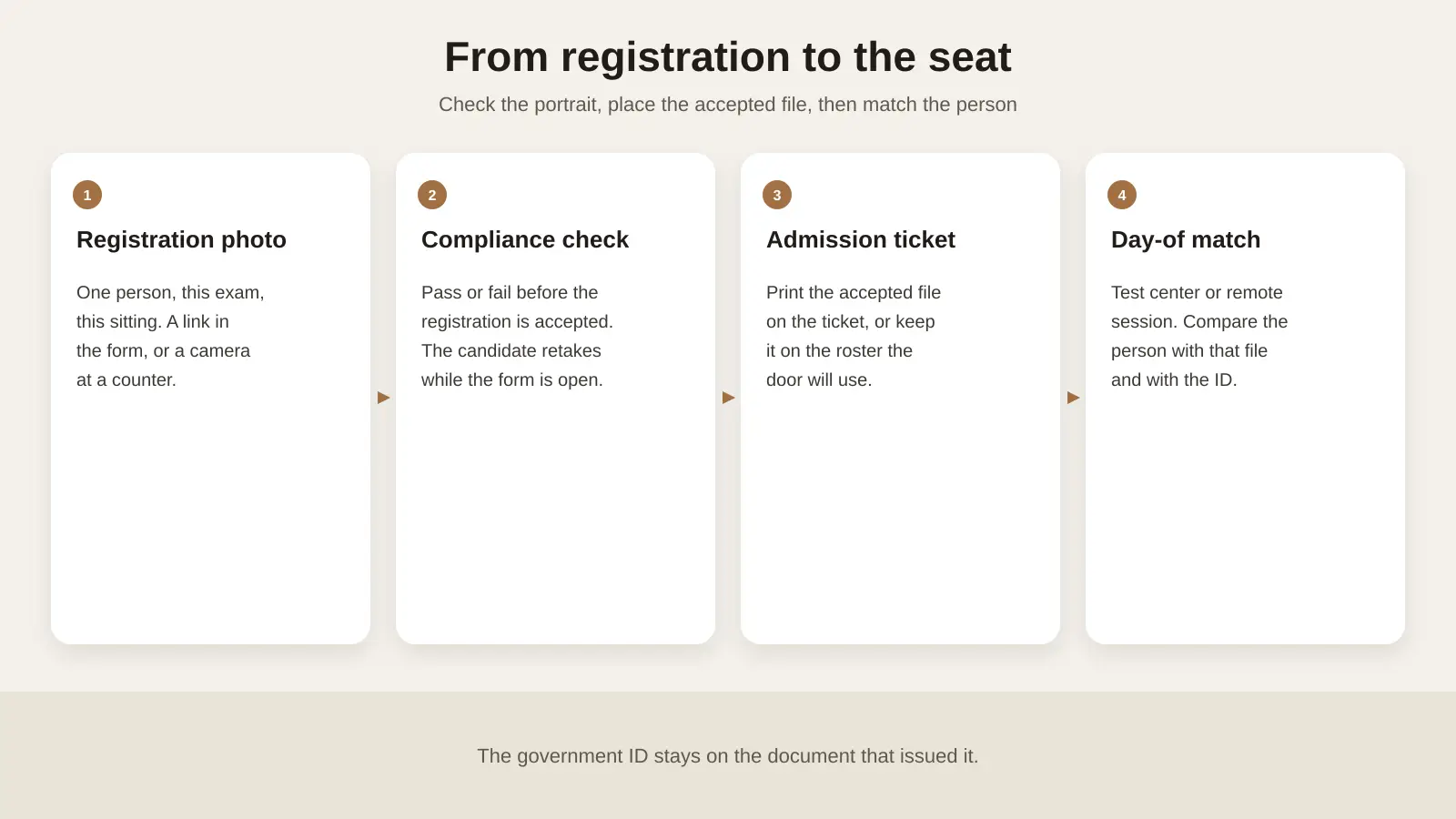
- Name the file before registration opens. The registration portrait belongs to this exam and this sitting. The check-in capture is a second file, taken on the day or in the remote session, and stored on the same candidate record. The government ID remains the issuer's document. A generated headshot stays on a careers page.
- Collect the portrait while the candidate is still in the form. One link per candidate, expired after use, is available per request from support@idphoto.ai. A candidate who cannot use a phone uses a camera at a counter before the window closes. Send the common mistakes guide back with the retake.
- Run a photo compliance check before the registration is accepted. The photo compliance check covers exam boards, test centers, and online exam platforms. It returns a pass or a fail, the rule that failed, and whether to correct the photo or take it again. Tell the candidate the photo was checked. The exam body still decides. Background removal and photo enhancement apply only when that exam's rules allow a correction.
- Place the accepted file where the day will need it. Print it on the admission ticket, sometimes called a hall ticket, when your program prints a portrait. Keep the same file on the roster when the ticket does not show a photo, which is how College Board describes the SAT ticket. Print and mailing, available per request, covers a paper ticket before the sitting. The layout is yours.
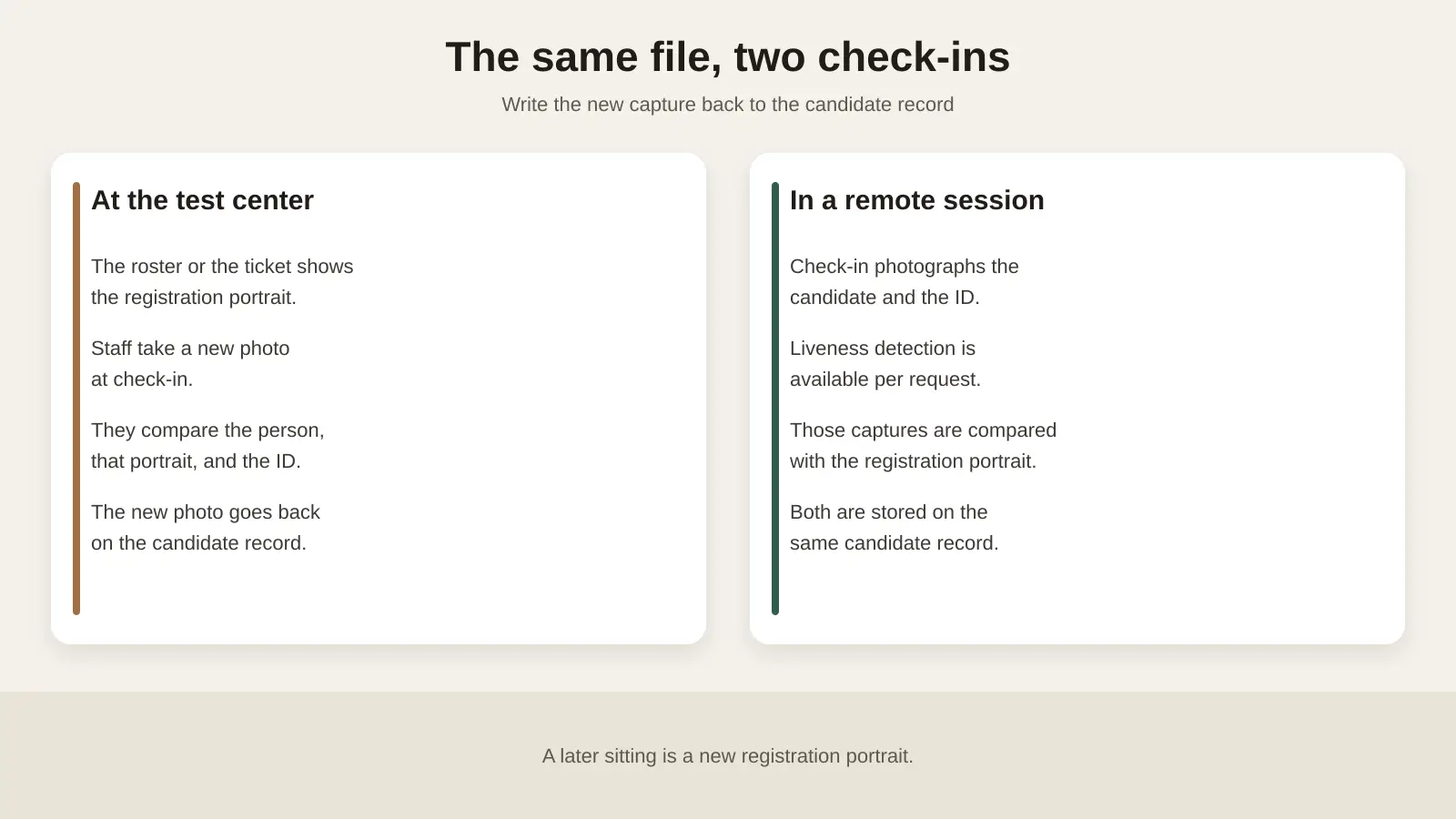
- Match the person at the test center. Staff compare the candidate, the registration portrait, and the ID the candidate presents. Write the new check-in photo back to the same record. Face comparison sets the two portraits side by side for a person to review. The invigilator still decides who enters.
- Match the person in a remote session before the exam starts. Check-in photographs the candidate and the ID, as OnVUE describes. Liveness detection, available per request, checks that the capture is a live person. Compare it with the registration portrait and store both on the candidate record. When your rules allow it, repeat a check-in that cannot finish before the seat is lost.
- Close the file on a date you choose. Keep the registration portrait and the check-in capture for the period your retention rule names, then delete the copies you hold. A later sitting is a new file. Take the copy back, or use a temporary link of 2 hours to 14 days.
Batch preparation returns a retake list before the window closes. A candidate who fails on Friday 27 November still has the counter on Saturday, and the 5 December roster is built from accepted files.
What should an exam organization require from a photo service?
| What you need | What good looks like |
|---|---|
| A template per exam | Size, crop, and background for that program. The catalog covers 300+ specifications across 200+ countries for passports, visas, and ID cards. The exam uses the template you name. A passport sits outside it. |
| A result before the window closes | Pass or fail, the rule that failed, and a retake while the form is still open. The SAT's five-day photo change is one published cutoff. |
| A path other than a shared inbox | One link per candidate, expired after use, plus a camera at a counter for anyone who cannot use the link. |
| The record that owns the candidate | The file returns to the registration system with the sitting date. Workday or SAP SuccessFactors sync is available per request for employees already in those systems. Candidates stay off that sync. |
| A check a proctor can explain | Face comparison of the registration portrait and the check-in capture. Liveness detection on a remote capture, available per request. The organization still decides who sits. |
| A copy you can delete | Take the image back, or use a temporary link of 2 hours to 14 days. The date is the one your retention rule names. |
How do you roll this out for one exam first?
Write the file rule before the first link. Name the template, whether the ticket prints the portrait, who may see the roster, and the date the copies are deleted. Name who handles a candidate turned away at the door, and who handles a remote check-in that cannot start.
Run one program for one sitting. Use the 5 December 2026 example, with registration closing on 28 November. Include a phone upload, a same-day retake, one printed ticket, one roster that holds the portrait when the ticket does not, a test-center match, and one remote check-in. Ask the door to walk through one failed file before the window closes.
Add the next program after a write has held. Prove a clean upload, a same-day retake, and one failed write that is retried. Then open the second program on its own template. Connect Workday or SAP SuccessFactors only for staff already in those systems, after support confirms it. Candidate photos stay in the registration system. A counter that takes portraits for candidates can use the Shopify store template with one-click setup, available per request. That counter sells the photo. The exam file still lands in your registration system. A passport taken at the same counter follows the retail page and stays off the exam record.
Where do candidate photos usually fail?
| What fails | What to change |
|---|---|
| The registration form accepts any image | Check before the registration is accepted, and send the retake while the form is open. |
| The only file is a scan of a passport | Capture the exam portrait again. The passport photograph stays on the passport. A UK passport photograph meets GOV.UK photo rules. HM Passport Office still decides. A UK passport photo code retrieves that separate file. |
| The ticket is printed from a file that failed | Print only an accepted file. When the ticket does not show a photo, put the accepted file on the roster staff actually open. |
| The check-in photo stays in the proctoring tool | Write it back to the candidate record, next to the registration portrait. |
| Staff review the queue the night before | Batch the sitting before the window closes, and keep a counter camera for the last day. |
| The same portrait is reused years later | A new sitting is a new file. Delete the copy on the date your rule names. |
Who may see a candidate photograph?
The candidate, the registration team, the staff who match a face, and the proctor for that session may see the file that role needs. Delete the copies you hold on the date your retention rule names. GDPR Article 5(1)(e) and the CCPA apply where those laws apply. The data privacy policy covers encrypted transmission, a temporary link of 2 hours to 14 days, or taking the image back. US and EU processing are available. Other regions are available per request.
What do exam operations leads ask?
Can the registration photo be a copy of a passport?
Capture the exam portrait for this sitting. The passport photograph stays on the passport. A UK passport photograph must meet GOV.UK photo rules, and HM Passport Office still decides.
Does a pass mean the candidate may sit?
A pass means the rules that were checked did not fail. The exam body still decides who is admitted and whether a score stands. Tell the candidate the photo was checked.
Does every admission ticket show the photo?
Put the accepted file where staff will look. College Board says the SAT admission ticket will not show the photo, and that staff use the registration photo. When your program prints the portrait on the ticket, print the accepted file.
Can one registration portrait serve both the test center and a remote session?
The registration portrait is the file both paths compare. The check-in capture is new, taken at the center or in the remote session, and stored on the same record.
Can a candidate send the photo from a phone?
Yes. One link, expired after use, is available per request from support@idphoto.ai. Keep a camera at a counter for anyone who cannot use the link.
When should the photograph be deleted?
Delete the copies you hold on the date your retention rule names. A later sitting is a new file. A passport follows the date the issuer prints.
What does preparing the photograph cost?
See pricing. The catalog covers 300+ specifications across 200+ countries. Pricing for a compliance check is available on request.
How does idphoto.ai fit this workflow?
The idphoto.ai API is the photo step. It prepares a portrait to the template you name, checks the capture, and returns a file for the registration record, the ticket, or the roster. The exam organization decides who may sit. A UK passport photo code retrieves a photograph that meets GOV.UK photo rules, when a candidate also needs that document. HM Passport Office still decides. That code stays off the exam record.
Templates, the self-service link, Workday or SAP SuccessFactors sync for staff, print and mailing, liveness detection, another processing region, and the Shopify store template with one-click setup are each available per request. Email support@idphoto.ai with the exam template, whether the ticket prints the portrait, and how the file returns to the registration system. Samples stay in the API docs.