
The endpoint behind this page is the AI headshot API: POST /api/generate-portrait. You send a reference portrait, a text prompt, and optionally a seed. It returns new portrait images. It does not validate a passport, visa, or other identity document, and it should not be described as one. Staff ID files that have to match a badge template belong on the employee badge photo API.
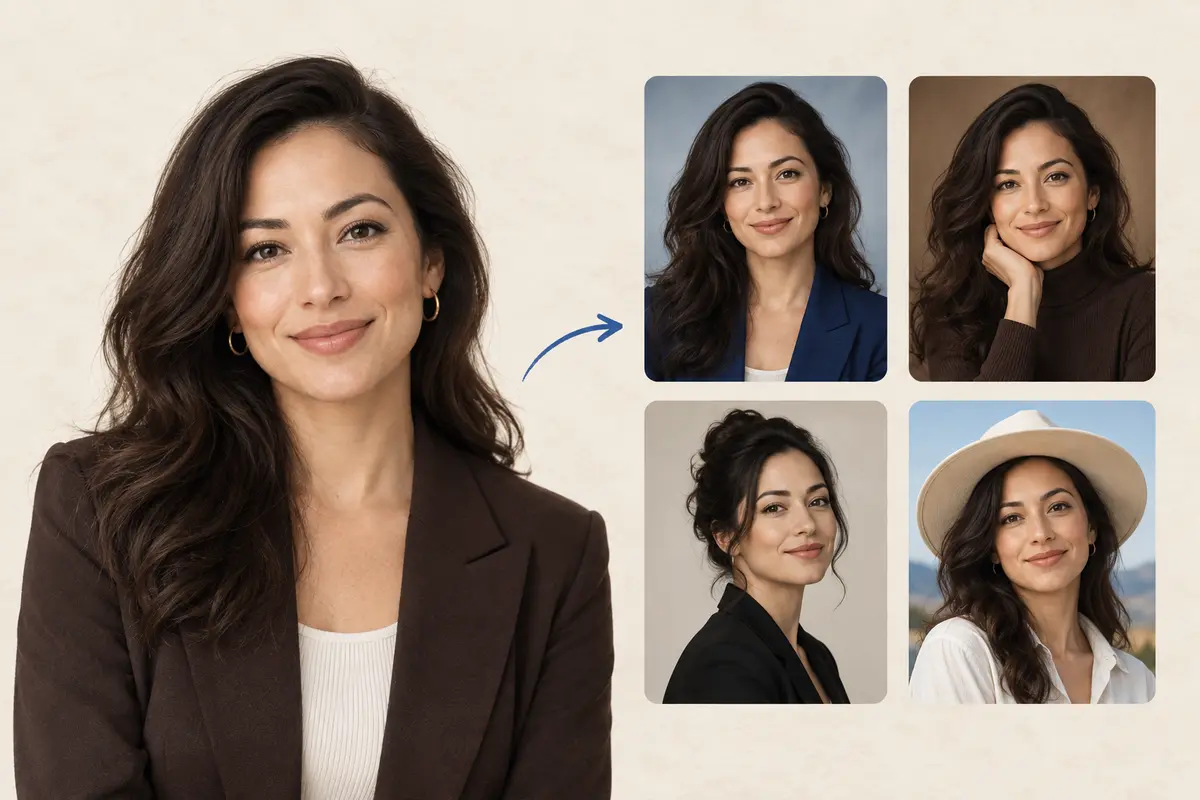
A headshot from a reference photo and a prompt
The prompt describes lighting, background, clothing, and photographic style. The reference image is whose face you are trying to keep. identityScale runs from 0 to 1 and defaults to 0.8. Higher asks the model to stay closer to the reference. A fixed prompt and a positive seed can be saved and reused so a team’s portraits share a look. The docs are clear that this improves consistency and does not guarantee a pixel-identical composition.
Not a passport photo
Generated headshots are a creative portrait workflow. Do not submit them as passport or visa photos. US rules reject photos created or edited with artificial intelligence. UK digital photos must be unedited. Use the Passport Photo API when the file has to meet a document specification, and use an unedited capture for US and UK passports.
Headshot request and response
The base URL is assigned to your integration. It is not the regional /v2 host used by the passport endpoints. The reference says access and the service base URL are provided separately.
curl -sS -X POST "$HEADSHOT_BASE_URL/api/generate-portrait" \
  -H "Content-Type: application/json" \
  -d '{
    "apiKey": "YOUR_API_KEY",
    "prompt": "Professional studio headshot, neutral background, soft even lighting, business attire",
    "seed": 18421,
    "sampleNumber": 2,
    "identityScale": 0.8,
    "inputImages": ["data:image/jpeg;base64,..."],
    "outputImageWidth": 768,
    "outputImageHeight": 1024
  }'
{
"outputImages": [
"data:image/jpeg;base64,...",
"data:image/jpeg;base64,..."
]
}The prompt and seed 18421 are the sample in the headshot reference, so you can see the field types. Replace both with the style you actually want. The number of entries in outputImages follows sampleNumber.
Fields and limits
| Field | Required | Limit |
|---|---|---|
apiKey | Yes | A key enabled for headshot generation. |
prompt | Yes | Lighting, background, clothing, and style in text. |
inputImages | Yes | Base64 reference images. Currently one primary reference is supported. |
seed | No | Default -1 (random). A positive integer is the repeatable style handle. |
sampleNumber | No | Default 1. Range 1 to 8 images per call. |
identityScale | No | Default 0.8. Range 0 to 1. |
outputImageWidth, outputImageHeight | No | Each axis from 512 to 2024. Defaults 768 and 1024. The docs suggest 768 × 768 or 768 × 1024. |
Use a clear, front-facing reference with one subject. Avoid a small face, severe blur, heavy occlusion, and extreme poses. Review identity and artifacts before you show or store an output. Base64 responses get large. Set a timeout and do not log the payload.
Directories, agencies, and studios
- HR and company directories. Save one prompt and one positive seed, name it something like
corporate-headshot, and run it across employees who opted in. This is a styled portrait for a website or org chart. The badge printer still wants the specification-sized employee photo. - Agencies. Keep a prompt per client brand.
sampleNumberup to 8 gives the art director a set to choose from. Reject frames that drift from the reference before they go to the client. - Studios. Offer a headshot sitting that starts from a reference capture and a house style, alongside real ID-photo work that must not be generated. Do not mix the two files in the same delivery folder.
- Apps. If the feature is “profile photo,” say so in the UI. If the feature is “passport photo,” call the Passport Photo API and do not send the user through this endpoint.
How to call the headshot API
- Request headshot access and the base URL for your account. Do not assume
api-us.idphotoapp.com. - Collect one front-facing reference on your server.
- Lock a prompt and a positive seed once you like the look. Store them in your app, not in the image.
- Call
/api/generate-portraitwithsampleNumberbetween 1 and 8. - Show the
outputImagesdata URIs to a reviewer. Discard frames that do not look like the person. - Keep the API key on the server. Read the data privacy policy before you send employee photos.
Why a prompt and seed, not a style menu
A fixed menu of “cartoon” or “anime” styles is not what the reference publishes, so this page does not pretend it does. You describe the photograph you want, you pin it with a seed, and you control how tightly identity is held. The same account can still remove a background, enhance a real capture, or cut a true ID photo when the job is a document rather than a portrait variation.
FAQ
Is the AI Avatar API a passport photo API?
No. The headshot endpoint generates portrait variations from a reference image and a prompt. It does not apply a document specification and must not be presented as an official identity-document photo.
How many images can one call return?
sampleNumber is 1 to 8 and defaults to 1. outputImages has one entry per sample. Only one primary reference image is supported in inputImages today.
How do I keep a team’s headshots in one style?
Save the prompt and a positive seed, then reuse that pair with each person’s reference image. The docs say this improves style consistency and does not guarantee a pixel-identical composition.
What output sizes are allowed?
Width and height are each from 512 to 2024 pixels. Defaults are 768 by 1024. Recommended examples in the docs are 768 by 768 and 768 by 1024.
Can I use a generated headshot on a US or UK passport application?
No. Those issuers do not accept an AI-created passport photo or a photo corrected with the Fix Passport Photo API. Create the document file from an unedited capture with the Passport Photo API, and follow the issuer’s photo rules.